

Looking for the perfect wireless keyboard and mouse combo that balances performance, comfort, and style? Whether you’re a gamer, a remote worker, or someone who just hates tangled cables, finding the right wireless setup can transform your workspace. In this roundup, we’ve tested and reviewed the top 10 best wireless keyboard and mouse combos available today—highlighting features like battery life, ergonomic design, connectivity options, and overall value. From RGB-lit gaming rigs to ultra-slim office essentials, we’ve got something for every need and budget.
Quick Product Comparison
Our Top 10 Best Wireless Keyboard And Mouse Reviews – Expert Tested & Recommended
1. Best Wireless Keyboard and Mouse Combo for Gaming with RGB and High DPI
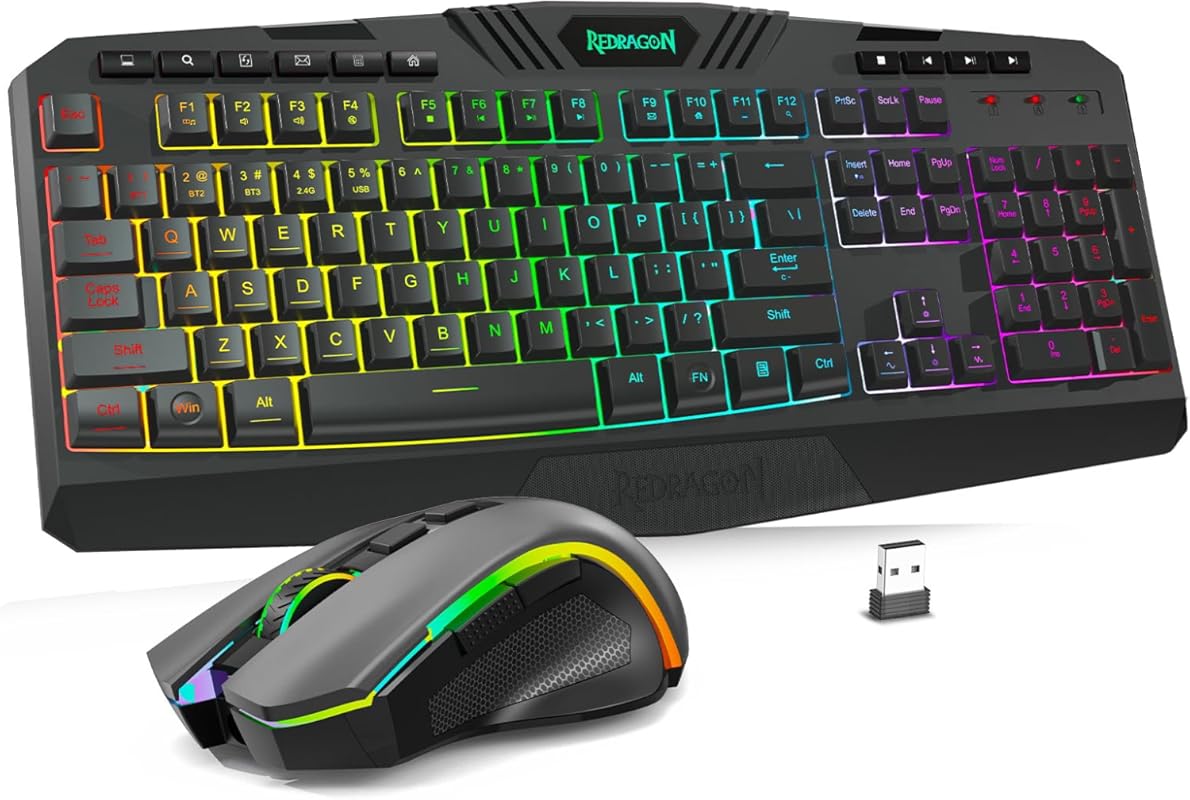
The Redragon Tri-mode Wireless Gaming Keyboard and Mouse Combo delivers a powerful blend of performance and style, making it ideal for gamers who want freedom from cables without sacrificing features. With true RGB backlighting, five adjustable DPI levels, and a tri-mode connection (wired, 2.4GHz wireless, and Bluetooth), this combo offers unmatched flexibility for modern gaming setups.
Key Features That Stand Out
- ✓ 8 customizable RGB backlight patterns with adjustable speed and brightness
- ✓ 5 DPI levels (800–4800) for precise cursor control
- ✓ Tri-mode connectivity: wired, 2.4GHz wireless, and Bluetooth
- ✓ Full-sized layout with numeric keypad and anti-ghosting keys
- ✓ Durable build with mechanical-like feel
Why We Recommend It
This combo stands out for its versatility and responsiveness. Whether you’re gaming, streaming, or working, the low-latency wireless connection ensures smooth performance, while the programmable keys and RGB lighting add a personal touch. The sturdy construction feels premium, and the tri-mode setup means you’re never locked into one connection type.
Best For
Gaming enthusiasts, streamers, and users who want a high-performance wireless setup with customizable lighting and reliable connectivity across multiple devices.
Pros and Cons
Pros:
- Excellent RGB lighting with multiple patterns
- High DPI mouse with precise tracking
- Tri-mode connection offers flexibility
- Full-sized keyboard with responsive keys
Cons:
- Battery life could be longer in wireless mode
- Software for customization is basic
Customer Reviews
Customer Review: “I’d never had wireless keyboards or mice until recently. Wanting to get away from ‘wire spaghetti’ on my desk made getting a set a logical choice. The first one I bought was from SABLUTE, yeah, I hadn’t heard of it either but it sounded good in the reviews. Within the first day I noticed that the ke”
Customer Review: “This is a wired RGB keyboard and mouse. The illumination is bright enough to see in the daytime. They have some really cool features that are programmable and a decent cycle of color exchanges. The mouse and keyboard have preset funcionality, and the mouse has selective dpi presets that are pretty g”
2. Wireless Keyboard and Mouse Combo, 2.4G Full Size Wave Keys Ergonomic Keyboard with Wrist Rest an…
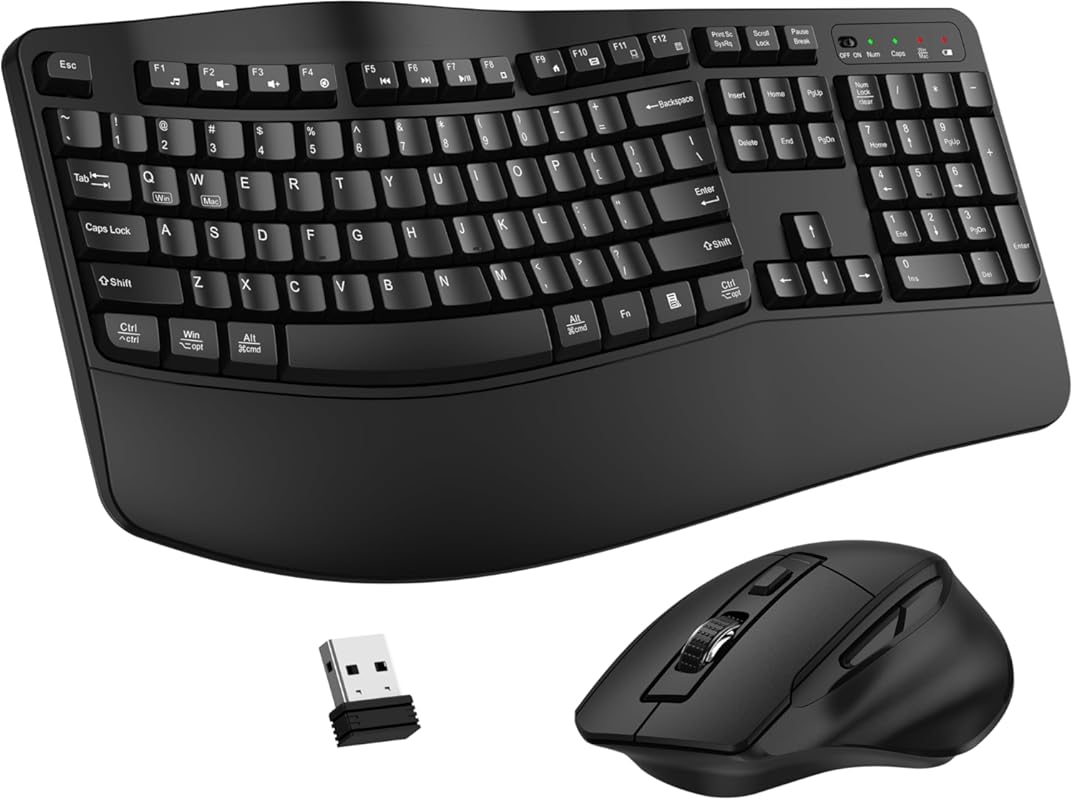
This ergonomic wireless keyboard and mouse combo features a wave-shaped design and built-in wrist rest for superior comfort during long typing sessions. The 2.4GHz connection ensures lag-free performance, and the full-size layout includes multimedia keys for added convenience.
Key Features That Stand Out
- ✓ Wave ergonomic keyboard with natural finger alignment
- ✓ Built-in wrist rest for comfort and support
- ✓ Plug-and-play 2.4GHz USB receiver (10m range)
- ✓ Contoured mouse with smooth optical tracking
- ✓ Quiet keys ideal for shared workspaces
Why We Recommend It
The wave design reduces hand strain, making this combo perfect for office workers and students. The stable wireless connection and comfortable mouse make it a top pick for everyday use. It’s also affordable without sacrificing quality.
Best For
Office workers, remote employees, and anyone seeking an ergonomic and quiet typing experience.
Pros and Cons
Pros:
- Ergonomic wave design reduces wrist strain
- Stable 2.4GHz wireless connection
- Quiet, responsive keys
- Affordable price point
Cons:
- Limited customization options
- Battery life could be better
Customer Reviews
Customer Review: “Very satisfied with this wireless keyboard and mouse combo! The setup was quick and easy, and the 2.4G connection is stable with no lag. The ergonomic wave design makes typing comfortable even after long hours. The mouse is smooth and responsive. Great quality for the price — highly recommend!”
Customer Review: “This wireless keyboard and mouse are ergonomic and comfortable for long use. Stable connection, smooth response, and precise control. The design looks sleek and works perfectly for daily office work and home use without fatigue issues.”
3. seenda Wireless Bluetooth Keyboard and Mouse Combo, SKM64
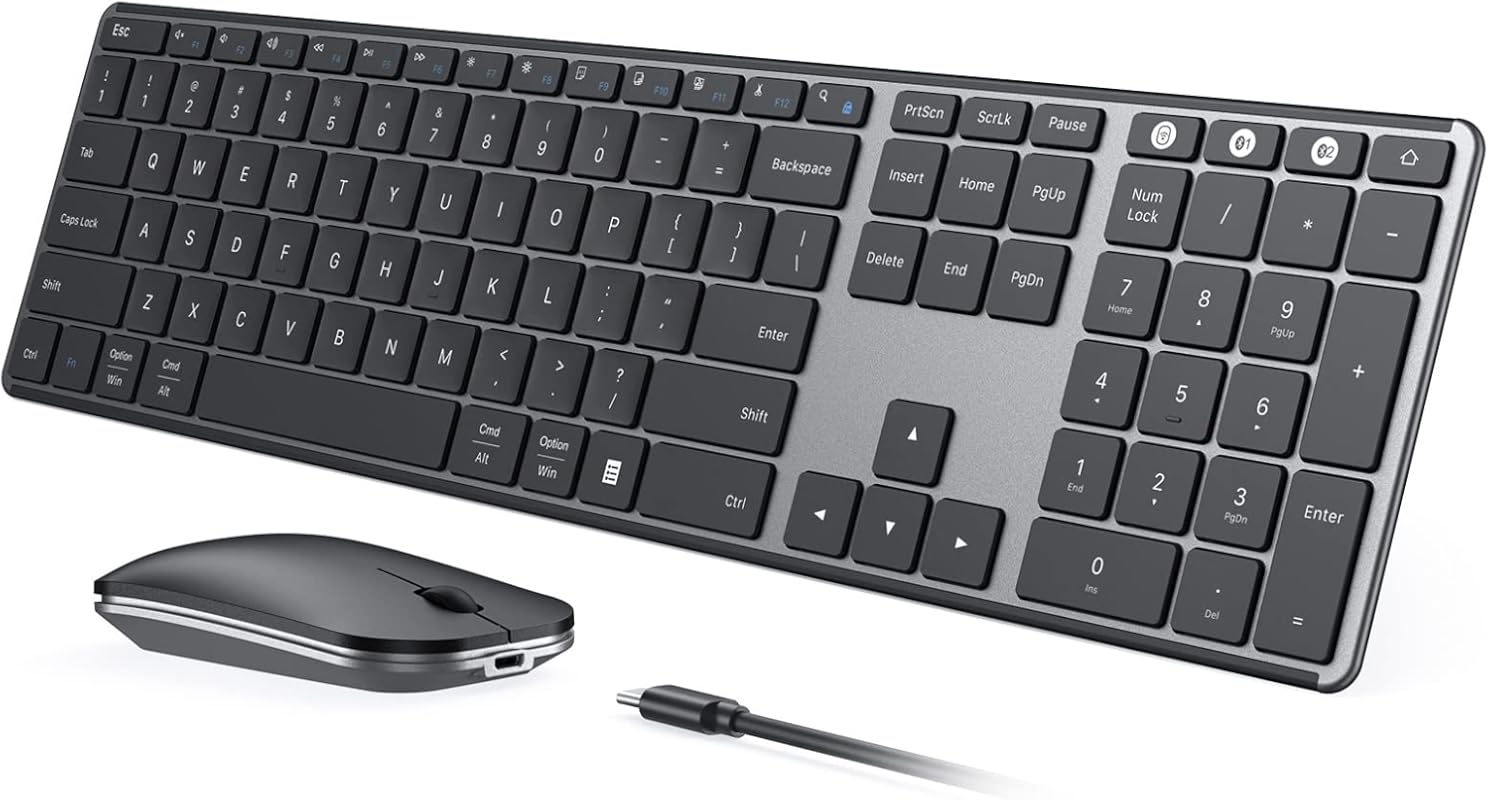
The seenda SKM64 combo offers dual connectivity via Bluetooth and 2.4GHz USB, making it ideal for users with multiple devices. It supports both Windows and Mac layouts and includes a full-sized keyboard with number pad, all at an affordable price.
Key Features That Stand Out
- ✓ Triple device connectivity (USB, BT1, BT2)
- ✓ Compatible with Windows, macOS, iOS, and Android
- ✓ Quiet, slim-profile keyboard with full layout
- ✓ Responsive optical mouse with 1600 DPI
- ✓ Rechargeable battery with USB-C
Why We Recommend It
This combo delivers excellent value with its multi-device support and cross-platform compatibility. The quiet keys and slim design make it great for students and hybrid workers who switch between laptops, tablets, and desktops.
Best For
Students, freelancers, and users who need a budget-friendly combo that works across multiple operating systems.
Pros and Cons
Pros:
- Affordable price with solid performance
- Works with Windows, Mac, iOS, and Android
- Quiet, comfortable typing experience
- Easy device switching
Cons:
- Battery life is moderate
- Limited customization software
Customer Reviews
Customer Review: “Love this keyboard. I had a similar version that lasted for years; that one finally went out and this is the third keyboard I’ve purchased in 6 months and I finally found one I like. This one checks all the boxes:- whisper quiet keys and mouse- full keyboard, with number pad, but slim profile and “
Customer Review: “I’m so happy with my seenda Wireless Bluetooth Keyboard and Mouse Combo! Setup was super quick and easy — connected in seconds. The keyboard is slim, quiet, and feels great to type on, and the whole set looks so sleek on my desk. The mouse is smooth and responsive, with no lag at all.It’s stylish, s”
4. Wireless Keyboard and Mouse Combo, 2.4G Full Size Wave Keys Ergonomic Keyboard with Wrist Rest, P…
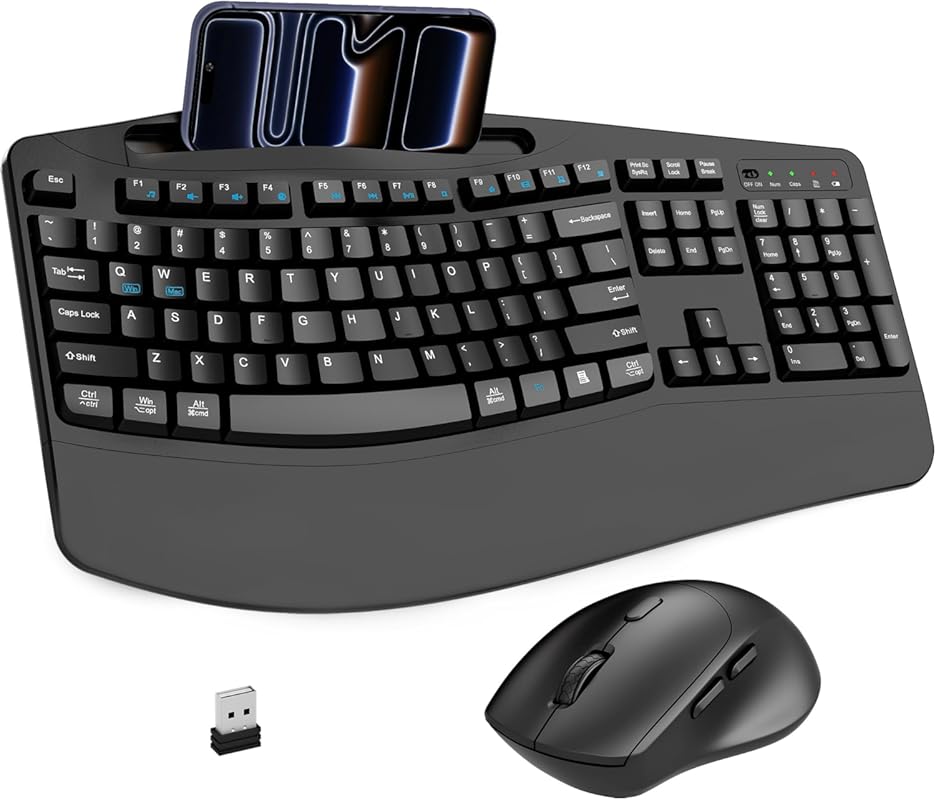
This combo features a wave-style ergonomic keyboard with a built-in wrist rest and phone holder, offering both comfort and convenience. The 2.4GHz wireless connection ensures reliable performance up to 33 feet, and the mouse includes adjustable DPI settings.
Key Features That Stand Out
- ✓ Wave ergonomic keyboard with palm rest
- ✓ Built-in phone/tablet holder for convenience
- ✓ 3-level DPI mouse (800/1200/1600)
- ✓ Plug-and-play 2.4GHz USB receiver
- ✓ Quiet keys and spill-resistant design
Why We Recommend It
The combination of ergonomic design and practical features like the phone holder makes this combo stand out. It’s ideal for users who multitask and want everything within easy reach without clutter.
Best For
Multitaskers, home office users, and anyone who values comfort and desk organization.
Pros and Cons
Pros:
- Ergonomic wave design reduces strain
- Phone holder adds convenience
- Quiet, responsive keys
- Spill-resistant build
Cons:
- Mouse lacks high-end DPI options
- Battery life is average
Customer Reviews
Customer Review: “I was pleasantly surprised by how comfortable the keyboard feels, especially with the wrist rest and phone holder right where I need them. Typing is smooth and quiet, which is perfect for late-night work without disturbing anyone. The wireless mouse is accurate and the 3-level DPI makes it easy to s”
Customer Review: “I’m really impressed with this Wireless Keyboard and Mouse Combo. The full-size wave-style ergonomic keyboard is extremely comfortable, especially for long typing sessions. The wrist rest provides great support and helps reduce strain on the hands, which makes a noticeable difference during work hou”
5. DELL Premier Multi-Device Wireless Keyboard and Mouse KM7321W
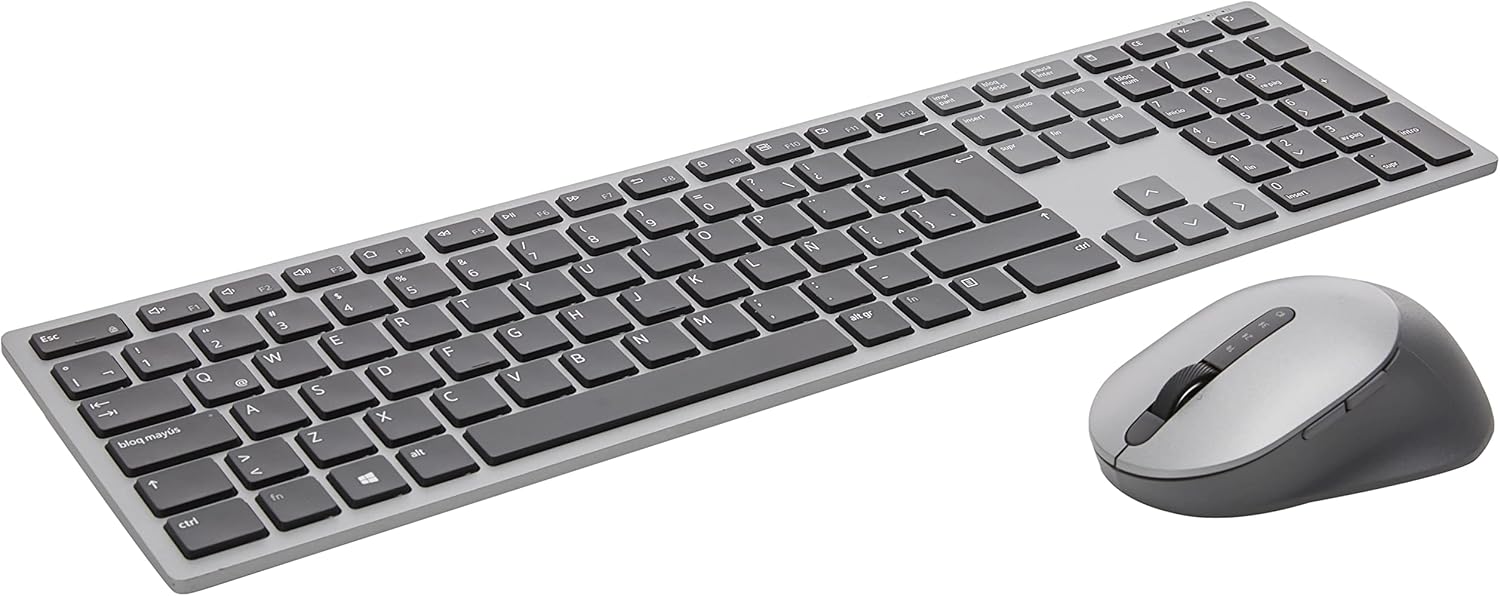
The DELL Premier KM7321W is a premium wireless combo designed for professionals who need seamless switching between multiple devices. With dual-mode RF 2.4GHz and Bluetooth connectivity, it supports up to three devices and offers a sleek, ultra-slim design.
Key Features That Stand Out
- ✓ Connect up to 3 devices via RF or Bluetooth
- ✓ Quiet, low-profile keys with responsive feedback
- ✓ Full-sized keyboard with number pad
- ✓ Long battery life (up to 3 years)
- ✓ DELL premium build quality and reliability
Why We Recommend It
DELL’s reputation for quality shines through in this combo. The quiet keys and stable connections make it perfect for office environments, while the multi-device support is ideal for users with laptops, desktops, and tablets.
Best For
Professionals, office workers, and users who need a reliable, high-quality wireless setup for multiple devices.
Pros and Cons
Pros:
- Excellent build quality and reliability
- Quiet, comfortable typing
- Long battery life
- Seamless device switching
Cons:
- Higher price point
- Limited customization features
Customer Reviews
Customer Review: “This is one, if not the best flat keyboard that I’ve ever used. Very quiet. Love the way it types!”
Customer Review: “This is one, if not the best flat keyboard that I’ve ever used. Very quiet. Love the way it types!Read more”
6. Wireless Keyboard and Mouse Combo – Full-Sized Ergonomic Keyboard with Wrist Rest, Phone Holder, …
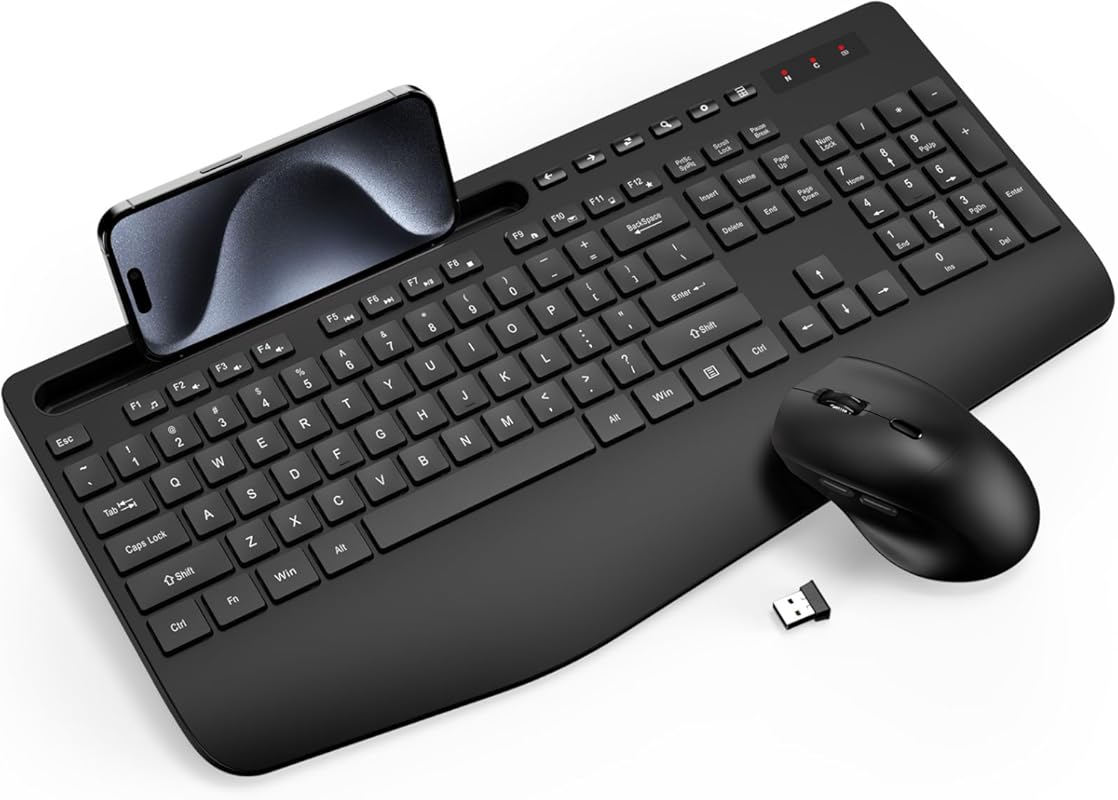
This combo offers a full-sized ergonomic keyboard with a built-in wrist rest and phone holder, plus a responsive wireless mouse. It features smart power-saving modes and a durable, spill-resistant design for everyday reliability.
Key Features That Stand Out
- ✓ Ergonomic palm rest and tilt legs
- ✓ Built-in phone/tablet holder
- ✓ Smart sleep mode to save power
- ✓ Quiet keys and durable build
- ✓ 2.4GHz wireless with 10m range
Why We Recommend It
The thoughtful design elements like the wrist rest and phone holder make this combo stand out for comfort and convenience. It’s a great choice for home offices and shared workspaces where quiet operation is important.
Best For
Home office users, students, and anyone who wants a comfortable, feature-rich wireless setup.
Pros and Cons
Pros:
- Ergonomic design reduces strain
- Phone holder adds practicality
- Quiet, responsive keys
- Spill-resistant construction
Cons:
- Mouse is basic in features
- Phone holder leans forward slightly
Customer Reviews
Customer Review: “This keyboard and mouse set is excellent. It was so easy to set, insert batteries, plug in usb receiver and it’s working. The mouse is so silent you can’t hear the buttons being pressed. The only small thing is that the phone/tablet holder leans a little too forward, pointing the phone screen slight”
Customer Review: “Wireless mouse and keyboard combo. Setup was super simple and easy.The mouse is a nice size for an adult, it is a bit too big for children to use easily. There are handy front and back buttons on the side of the mouse that make web browsing very easy.The keyboard has nice, quiet keys as well as a “
7. Amazon Basics Ultra Premium Wireless Keyboard and Mouse Combo – Rechargeable, Ultra Slim Design, …
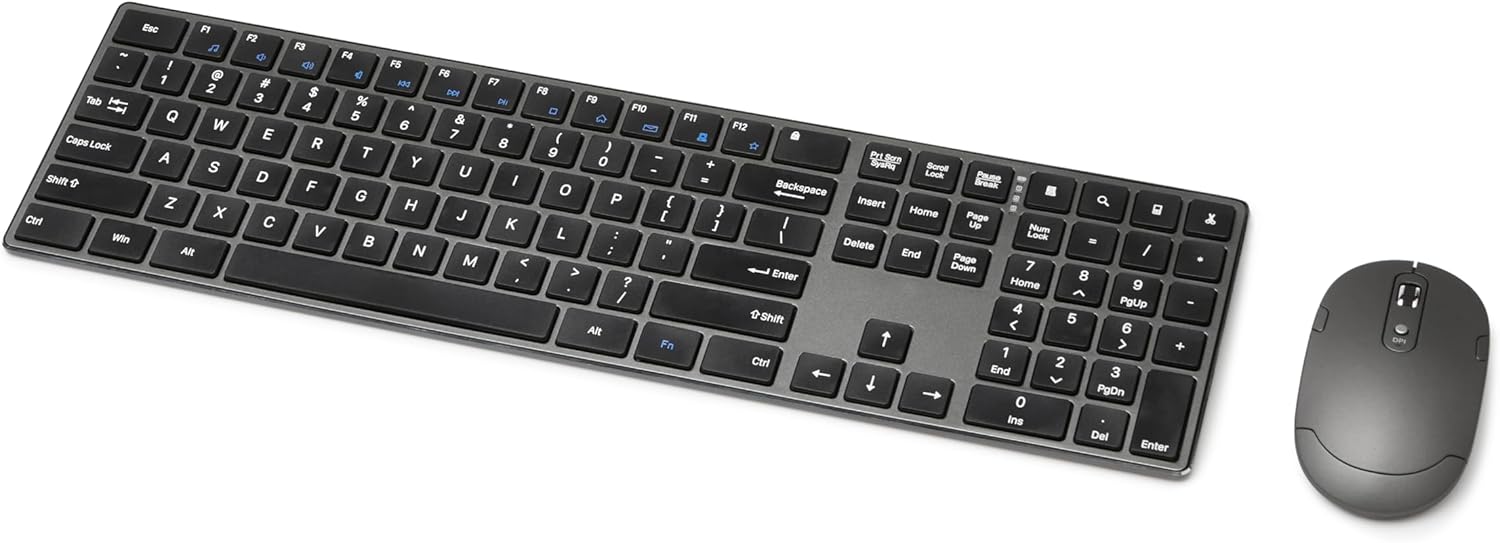
Amazon Basics delivers a premium wireless combo with an ultra-slim design, rechargeable batteries, and a full-sized layout. It uses a single USB receiver for both devices and offers reliable performance up to 33 feet.
Key Features That Stand Out
- ✓ Ultra-slim, modern design
- ✓ Rechargeable batteries with USB-C
- ✓ Plug-and-play 2.4GHz connection
- ✓ Full-sized keyboard with number pad
- ✓ Quiet keys and responsive mouse
Why We Recommend It
This combo offers excellent value with its premium feel and reliable performance. The rechargeable batteries and slim design make it ideal for users who want a clean, modern workspace without breaking the bank.
Best For
Budget-conscious users who want a premium look and feel without the high price tag.
Pros and Cons
Pros:
- Premium feel at an affordable price
- Rechargeable batteries
- Ultra-slim, space-saving design
- Easy setup and reliable connection
Cons:
- Battery life could be longer
- Limited customization options
Customer Reviews
Customer Review: “Being a novice of home labs, I recently started my first configuration of Proxmox on one of my PCs. I wanted to keep my accessories cheap, so I got the Amazon Basics Ultra Premium Wireless Keyboard and Mouse Combo, and to be completely honest, it has been just that.Setting everything up was a breeze”
Customer Review: “I’ve been using this keyboard and mouse set every workday for a few weeks, and it’s an absolute game-changer! The keyboard feels incredibly premium—sleek, full-sized with a number pad, and so quiet that it won’t disturb anyone around you. Setup couldn’t be easier—just plug in the USB receiver, and y”
8. Ergonomic Wireless Keyboard and Mouse Combo, 30dB Quiet Full Size Keyboard Set with Wave Keys & S…
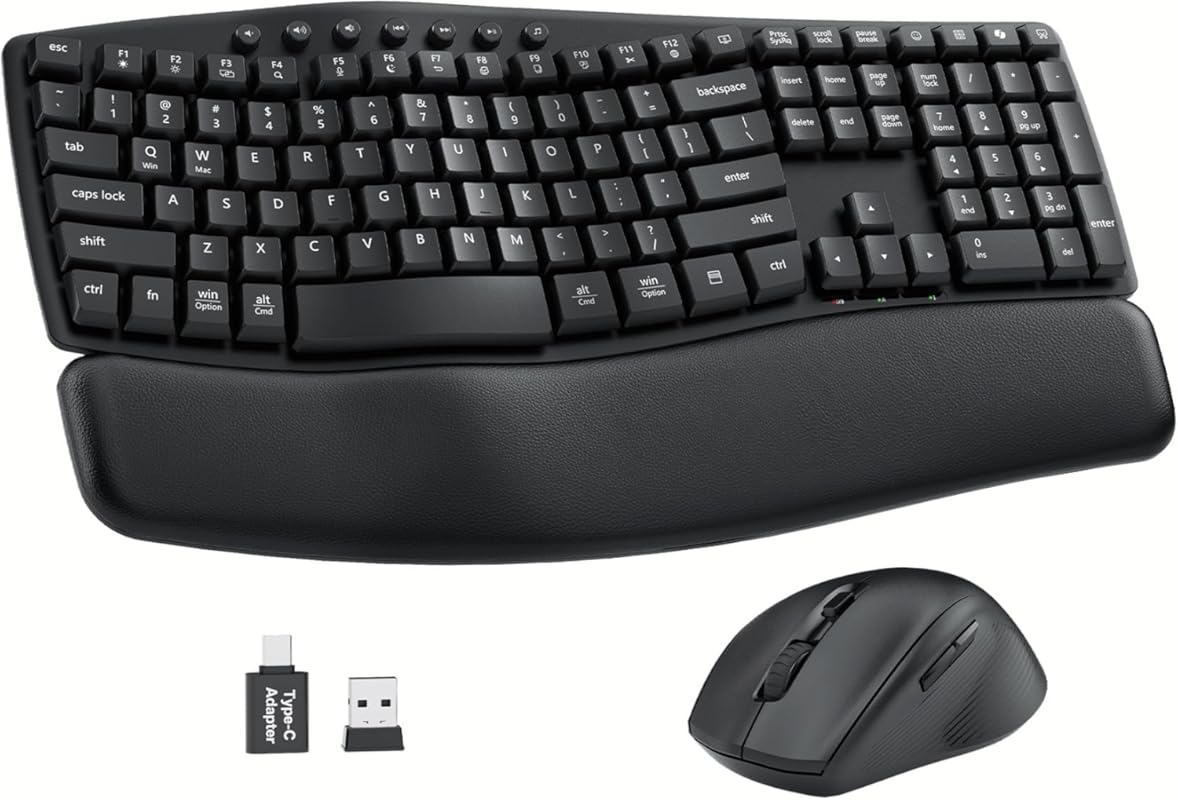
This combo features a wave-shaped ergonomic keyboard with a cushioned leather wrist rest and a quiet, responsive mouse. Designed for long typing sessions, it reduces wrist strain and offers a professional, modern look.
Key Features That Stand Out
- ✓ Wave design aligns with natural hand posture
- ✓ Cushioned leather wrist rest
- ✓ 30dB quiet keys for noise-sensitive environments
- ✓ Spill-resistant build
- ✓ 2.4GHz wireless with 10m range
Why We Recommend It
The ergonomic wave design and soft leather wrist rest make this combo ideal for users who type for hours. The quiet operation and spill resistance add durability, making it perfect for home or shared offices.
Best For
Long-time typists, writers, and office workers who need comfort and quiet operation.
Pros and Cons
Pros:
- Excellent ergonomic design
- Quiet, low-profile keys
- Soft leather wrist rest
- Durable, spill-resistant build
Cons:
- Slight learning curve for wave layout
- Mouse is basic in features
Customer Reviews
Customer Review: “This keyboard does not take long to get use to. It is an advantage to have the volume, forward and reverse keys on top. It also has paste and cut keys. The front wrist pad is a great size and really helps prevent fatigue. The keys are more comfortable than most keyboards and quiet. The slight c”
Customer Review: “Good price. Come completed 3 pieces set at this price.The keyboard is well ergonomic design. I use it for a longperiod of time without feeling a strain. Classic color anddesign. Palm rest is soft and gentle to palm. Material anddesign makes it look more expensive than it is. One reasonI pick this se”
9. Wireless Keyboard and Mouse Combo, Full-Sized Wireless Keyboard and Adjustable DPI Mouse, 2.4GHz …
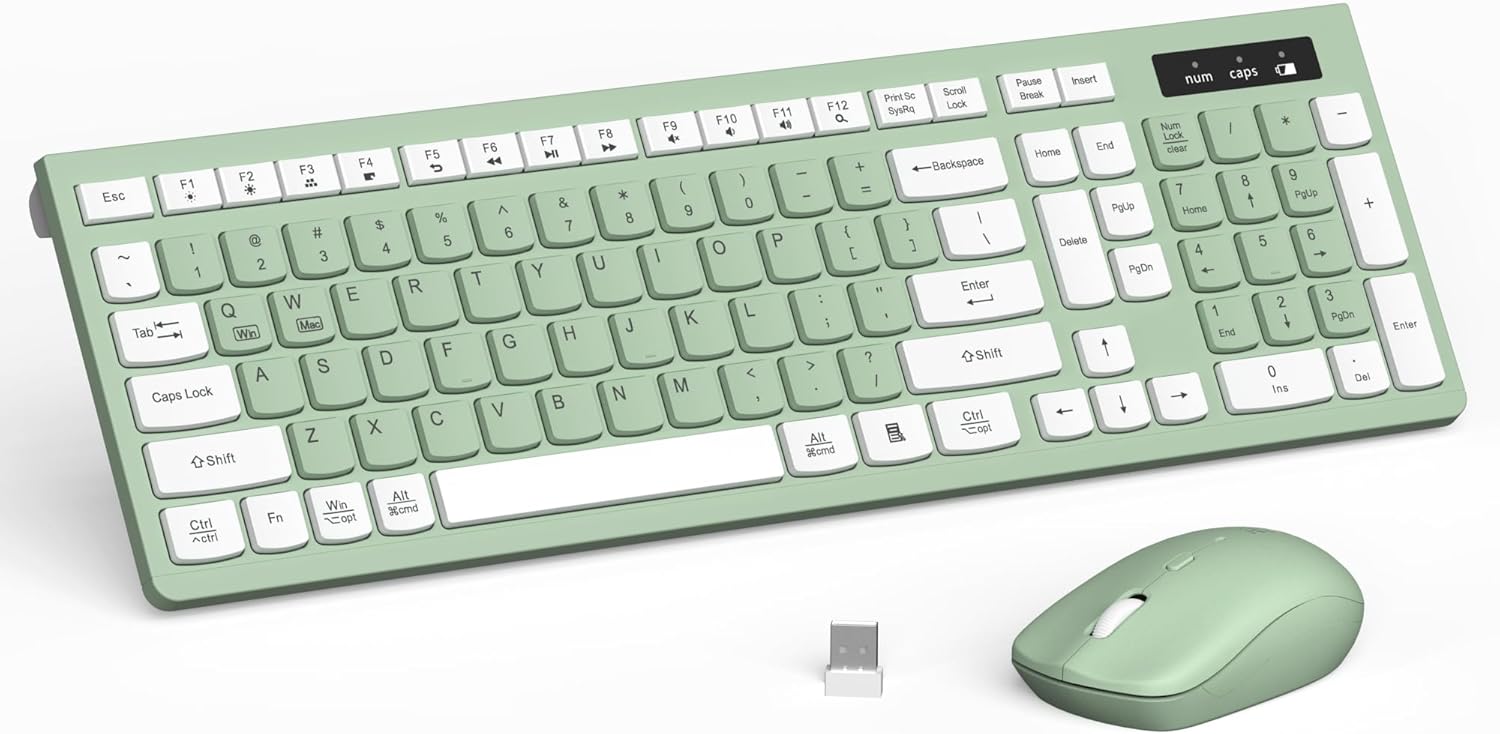
This combo offers a full-sized wireless keyboard with 12 multimedia keys and a mouse with adjustable DPI settings. The 2.4GHz connection provides stable performance up to 33 feet, making it ideal for home and office use.
Key Features That Stand Out
- ✓ Full-sized keyboard with multimedia keys
- ✓ Adjustable DPI mouse (800–1600)
- ✓ 2.4GHz wireless with 10m range
- ✓ Plug-and-play setup
- ✓ Quiet, responsive keys
Why We Recommend It
With its full-size layout and multimedia keys, this combo is great for productivity. The adjustable DPI mouse adds flexibility for different tasks, and the quiet keys make it suitable for shared spaces.
Best For
Office workers, students, and users who want a reliable, feature-rich wireless setup.
Pros and Cons
Pros:
- Full-sized keyboard with number pad
- Multimedia keys for quick access
- Adjustable DPI mouse
- Quiet, responsive performance
Cons:
- Battery life is moderate
- Limited high-end features
Customer Reviews
Customer Review: “Absolutely phenomenal, it’s lightweight and its color design is very clever. The mouse is great for work and gaming alongside it has a very textured mouse for the slightest movements. The buttons on both mouse and keyboard are very quiet and responsive. Highly recommend if you’re on the go or your g”
Customer Review: “Easy to set up and works flawlessly. The keys and mouse are quiet, comfortable, and responsive. Love the avocado green color—it looks great on my desk. Excellent value for the price.”
10. SABLUTE Wireless Keyboard and Mouse Combo Backlit – Compact Quiet Keyboard with RGB Mouse, Rechar…
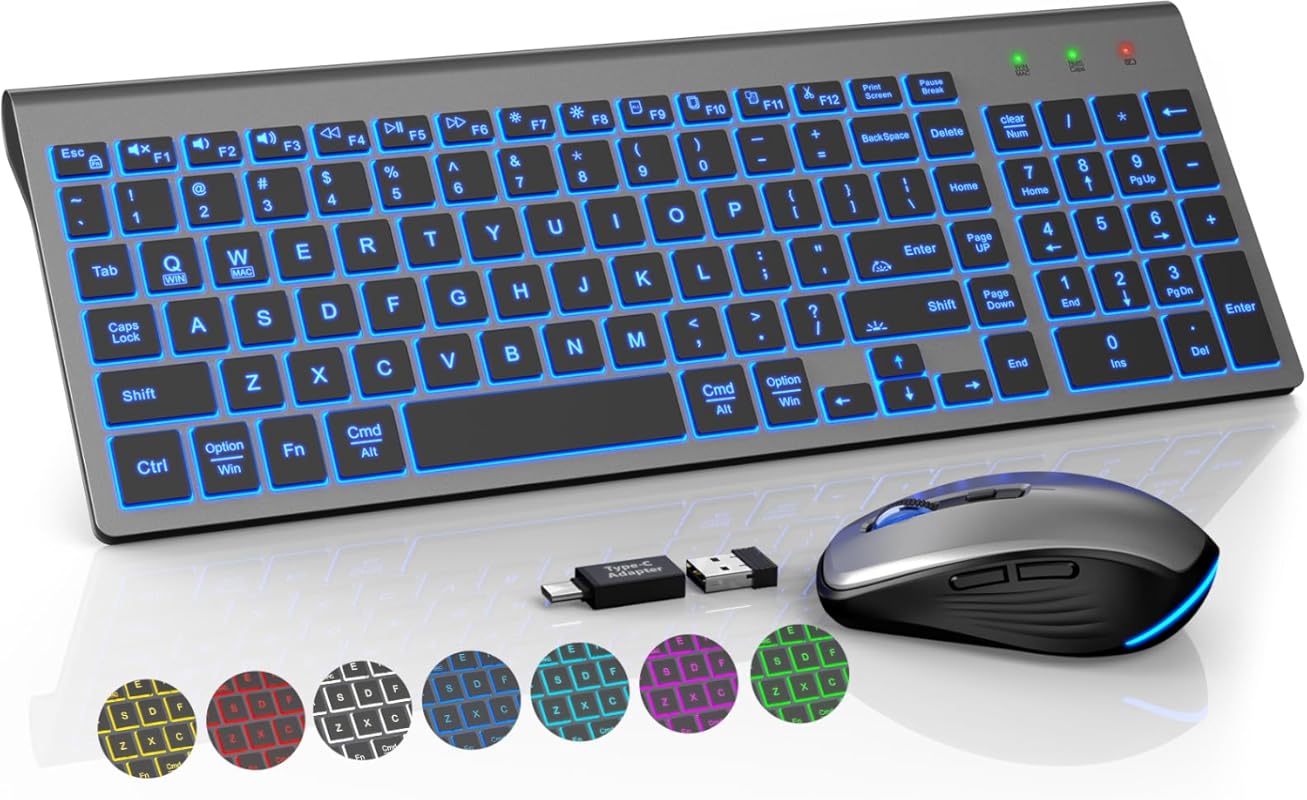
The SABLUTE combo features a compact backlit keyboard with 7-color RGB lighting and a matching RGB mouse. It supports both Windows and Mac layouts and includes rechargeable batteries for long-term use.
Key Features That Stand Out
- ✓ 7-color switchable backlight with brightness control
- ✓ RGB mouse with customizable lighting
- ✓ Windows and Mac layout support
- ✓ Rechargeable batteries with USB-C
- ✓ Quiet, compact design
Why We Recommend It
The vibrant RGB lighting and compact design make this combo perfect for gamers and users who want a stylish setup. The quiet keys and rechargeable batteries add practicality, while the dual layout support enhances versatility.
Best For
Gaming enthusiasts, style-conscious users, and those who want customizable lighting.
Pros and Cons
Pros:
- Vibrant RGB lighting on both keyboard and mouse
- Compact, space-saving design
- Rechargeable batteries
- Supports Windows and Mac
Cons:
- Compact size may not suit all users
- Battery life is average
Customer Reviews
Customer Review: “I’ve used this wireless keyboard for two months and it’s excellent. The compact design saves desk space, and the keys are whisper quiet. The backlighting is great for typing in low light. So far, the USB adapter connection has been flawless with no lagging, skipping or ghosting. I plugin the USB-C c”
Customer Review: “Great quality keyboard and mouse with many bright backlight options. Typing is super easy in this keyboard with minimal noise from the keys. Mouse is very responsive and smooth. A great value. Such a great keyboard I had to buy four already.”
Complete Buying Guide for Wireless Keyboard and Mouse
Essential Factors We Consider
When evaluating the best wireless keyboard and mouse combos, we focus on several key factors: connectivity (2.4GHz vs. Bluetooth), ergonomics (wrist rest, wave design), battery life, build quality, and special features like RGB lighting or multimedia keys. We also prioritize ease of setup and cross-platform compatibility to ensure the combo meets real-world needs.
Budget Planning
Wireless keyboard and mouse combos range from $20 to over $100. Budget options like the seenda SKM64 offer great value with multi-device support, while premium models like the DELL Premier KM7321W justify their price with superior build and reliability. For gamers, the Redragon combo provides high-end features at a mid-range price. Always balance cost with your specific needs—don’t pay for features you won’t use.
Final Thoughts
The best wireless keyboard and mouse combo depends on your lifestyle and priorities. If you’re a gamer, go for RGB and high DPI. For office work, prioritize ergonomics and quiet operation. And if you’re on a budget, the seenda SKM64 delivers excellent value. No matter your choice, wireless combos offer freedom, comfort, and modern convenience—making them a worthwhile upgrade from wired setups.
Frequently Asked Questions
Q: What’s the difference between 2.4GHz and Bluetooth wireless connections?
A: 2.4GHz uses a USB receiver for a stable, low-latency connection ideal for gaming and productivity. Bluetooth connects directly to your device and supports multiple devices but may have slightly higher latency. Most combos support both for maximum flexibility.
Q: How long do wireless keyboards and mice last on a single charge or battery?
A: Rechargeable models typically last 20–30 days on a full charge with moderate use. Battery-powered ones can last 6–12 months depending on usage. Always check the manufacturer’s estimate and consider auto-sleep features to extend life.
Q: Are wireless keyboard and mouse combos good for gaming?
A: Yes, especially those with low-latency 2.4GHz connections, high DPI mice, and anti-ghosting keys. The Redragon combo, for example, is designed specifically for gaming with RGB lighting and customizable DPI settings.
Q: Can I use a wireless combo with both Windows and Mac computers?
A: Many combos, like the seenda SKM64 and SABLUTE models, support both Windows and Mac layouts. Check the product description for compatibility before purchasing.
Q: Do I need to install software to use these combos?
A: Most work with plug-and-play setup—no software needed. However, some models (like the Redragon) offer companion apps for customizing RGB lighting and key functions.
In conclusion, the best wireless keyboard and mouse combo is one that fits your workflow, comfort needs, and budget. Whether you’re upgrading your gaming rig, setting up a home office, or just tired of tangled wires, the options above offer reliable performance and modern convenience. We hope this guide helps you find the perfect match—happy typing and clicking!
