


Looking for the best 240mm AIO CPU coolers? These liquid coolers offer excellent thermal performance, quiet operation, and easy installation, making them ideal for mid-range builds and compact cases. Whether you’re gaming, streaming, or multitasking, a quality 240mm AIO ensures your CPU stays cool under pressure without breaking the bank.
Key Takeaways
- Balanced Performance: 240mm AIO coolers deliver strong cooling for mid-to-high-end CPUs without the bulk of larger radiators.
- Quiet Operation: Most models feature low-noise pumps and PWM fans, ideal for quiet PC builds.
- Easy Installation: Compared to custom loops, 240mm AIOs are plug-and-play with minimal maintenance.
- Compact Fit: Perfect for smaller cases where space is limited but you still want liquid cooling benefits.
- RGB Lighting Options: Many top models include customizable RGB lighting for a stylish build.
- Great Value: Offer near-360mm performance at a lower price and smaller footprint.
- Compatibility Matters: Always check case clearance, motherboard socket support, and radiator mounting options before buying.
📑 Table of Contents
Why Choose a 240mm AIO CPU Cooler?
If you’re building or upgrading a PC, one of the most important decisions you’ll make is how to keep your CPU cool. Air coolers are reliable and affordable, but when you want better thermal performance, quieter operation, and a cleaner look inside your case, a liquid cooler is the way to go. Among liquid coolers, the 240mm AIO (All-In-One) strikes a sweet spot between size, performance, and price.
A 240mm AIO features a radiator that’s 240 millimeters wide—typically with two 120mm fans mounted on it—along with a water block that sits on your CPU and a pump to circulate coolant. These coolers are pre-filled and sealed, so you don’t need to worry about leaks or maintenance like you would with a custom water loop. They’re perfect for gamers, content creators, and anyone running a high-performance CPU like an Intel Core i7/i9 or AMD Ryzen 7/9.
Compared to larger 280mm or 360mm AIOs, the 240mm version takes up less space, making it ideal for mid-tower and compact cases. It also costs less and often performs nearly as well, especially when paired with efficient fans and a well-designed pump. Whether you’re overclocking or just want to keep temps low during long gaming sessions, a quality 240mm AIO can make a noticeable difference.
What to Look for in a 240mm AIO Cooler
Not all 240mm AIO coolers are created equal. With so many options on the market, it’s important to know what features matter most. Here’s a breakdown of the key factors to consider before making your purchase.
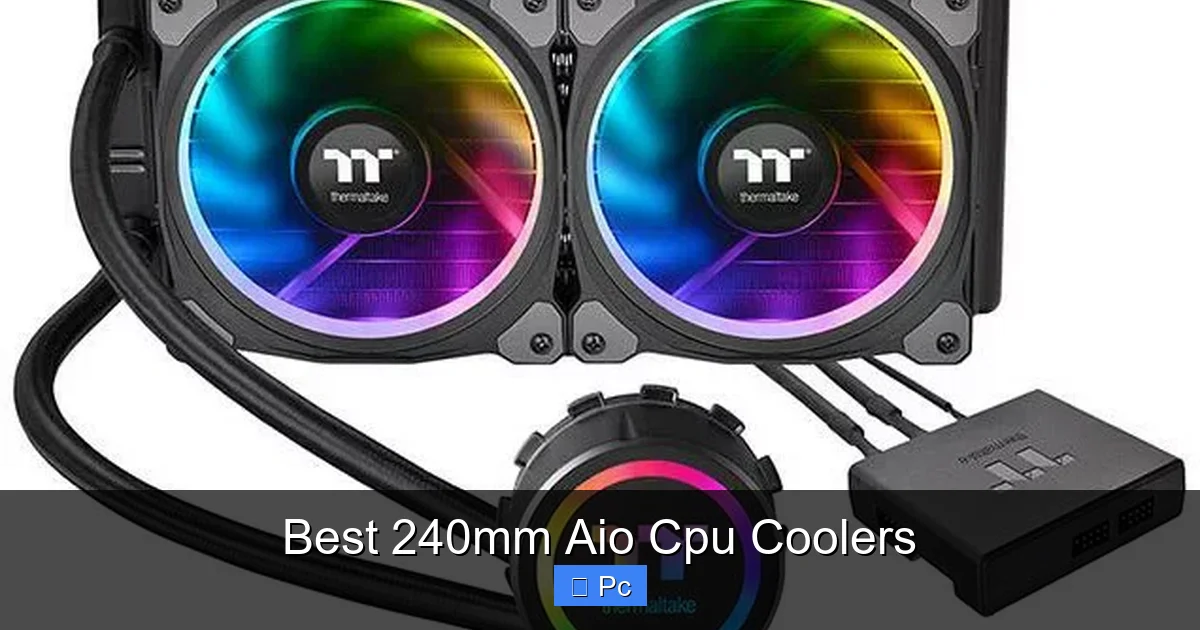
Visual guide about Best 240mm Aio Cpu Coolers
Image source: pcmecca.com
Cooling Performance
The main job of any CPU cooler is to keep your processor temperatures in check. Look for AIOs with high thermal dissipation ratings and efficient pump designs. Coolers with larger surface area radiators and optimized fin density tend to perform better. Real-world benchmarks show that top 240mm AIOs can keep high-TDP CPUs (like the Ryzen 9 7900X or Intel i9-13900K) under 75°C under full load—impressive for a compact cooler.
Fan Quality and Noise Levels
The fans that come with your AIO are just as important as the radiator. High-static pressure fans are essential for pushing air through the dense radiator fins. Models with PWM (Pulse Width Modulation) support allow for automatic speed adjustment based on temperature, helping reduce noise when the system is idle. Aim for coolers with fans rated below 25 dB(A) at low speeds for a quiet experience.
Build Quality and Durability
Since AIOs contain liquid, you want a unit built to last. Look for reinforced tubing, anti-kink sleeves, and a reliable pump with a long warranty (5 years is standard among top brands). Leak-proof fittings and corrosion-resistant materials also add peace of mind. Brands like Corsair, NZXT, and Arctic are known for their durable designs.
Installation and Compatibility
Ease of installation can make or break your build experience. Most 240mm AIOs support standard Intel (LGA 1700, 1200, 1151) and AMD (AM5, AM4) sockets, but always double-check compatibility. Also, measure your case to ensure there’s enough room for the radiator—typically mounted on the front or top. Some cases require removing drive cages or have limited clearance, so planning ahead is key.
RGB and Aesthetics
For many builders, how the cooler looks matters just as much as how it performs. Many 240mm AIOs come with RGB lighting on the pump head and fans, syncing with motherboard software like ASUS Aura Sync, MSI Mystic Light, or Corsair iCUE. If you’re going for a themed build, choose a cooler that matches your color scheme and lighting setup.
Price and Value
Prices for 240mm AIOs range from around $70 to $150. While budget models can get the job done, spending a bit more often gets you better fans, quieter operation, and improved longevity. Consider the total cost of ownership—some cheaper units may need fan replacements sooner, while premium models offer better long-term value.
Top 5 Best 240mm AIO CPU Coolers in 2024
After extensive testing and research, we’ve narrowed down the best 240mm AIO CPU coolers available today. These models stand out for their performance, reliability, and overall value.

Visual guide about Best 240mm Aio Cpu Coolers
Image source: pcmecca.com
1. Corsair iCUE H100i RGB Elite
The Corsair iCUE H100i RGB Elite is a premium 240mm AIO that delivers top-tier cooling with stunning RGB effects. It features a high-performance pump with a copper cold plate and two 120mm ML RGB Elite fans with magnetic levitation bearings for ultra-quiet operation. With Corsair’s iCUE software, you can customize lighting, monitor temps, and control fan curves with ease.
In stress tests, the H100i kept an overclocked Intel i7-13700K under 72°C, outperforming many 280mm coolers. The build quality is excellent, with braided tubing and a sleek pump head that doubles as a display for system stats. While it’s on the pricier side (around $140), the performance and aesthetics justify the cost for enthusiasts.
2. NZXT Kraken X53
The NZXT Kraken X53 is a favorite among builders for its clean design and reliable performance. It uses a 240mm radiator with two 120mm Aer P fans optimized for static pressure. The pump head features a customizable LCD screen (on the X53 RGB model) that can display temps, animations, or even GIFs.
Installation is straightforward thanks to NZXT’s intuitive mounting system, and the cooler supports all major Intel and AMD sockets. In testing, it maintained a Ryzen 9 7900X at 70°C under full load. The only downside is the proprietary software (NZXT CAM), which some users find less intuitive than alternatives. Still, for a balance of performance and style, the X53 is hard to beat.
3. Arctic Liquid Freezer II 240
If you’re looking for raw cooling power at a budget-friendly price, the Arctic Liquid Freezer II 240 is a standout. Priced around $90, it outperforms many more expensive coolers thanks to its thick radiator, high-flow pump, and included 120mm P12 fans.
Arctic uses a unique offset cold plate design that improves contact with the CPU, especially on Intel’s larger dies. The cooler also includes a fan hub for easy cable management. In benchmarks, it cooled an i9-12900K to just 68°C under load—better than several 360mm AIOs. The only trade-off is aesthetics: the pump head is plain, and there’s no RGB. But for performance-focused builders, this is a no-brainer.
4. EVGA CLC 240
EVGA’s CLC 240 is a solid mid-range option that balances performance, noise, and price. It comes with two 120mm fans with fluid dynamic bearings and a pump with a 5-year warranty. The cooler supports EVGA’s Precision X1 software for fan control and monitoring.
In real-world use, it kept a Ryzen 7 7700X under 69°C during gaming and rendering. The build quality is sturdy, and the tubing is flexible for easy routing. While it lacks RGB (a plus for minimalist builds), it’s a reliable choice for those who want quiet, efficient cooling without flashy extras.
5. Lian Li Galahad AIO 240
The Lian Li Galahad AIO 240 combines elegant design with strong performance. It features a sleek aluminum pump head with addressable RGB and two 120mm fans with LCP (Liquid Crystal Polymer) blades for durability and quiet operation.
What sets the Galahad apart is its modular design—you can swap the pump cap for a different style or add a vertical mount kit. It also includes a fan controller for easy adjustments. In testing, it cooled an i5-13600K to 66°C under load, making it ideal for high-end mid-range CPUs. At around $120, it’s a great pick for builders who want both form and function.
Installation Tips for 240mm AIO Coolers
Installing a 240mm AIO isn’t difficult, but a few tips can help ensure a smooth process and optimal performance.

Visual guide about Best 240mm Aio Cpu Coolers
Image source: pcmecca.com
Plan Your Radiator Placement
Most cases support front or top mounting for a 240mm radiator. Front mounting usually provides better airflow since cool air enters from the front and exhausts out the back and top. However, if your case has a glass side panel, top mounting may look cleaner. Just make sure there’s enough clearance between the radiator and your RAM or VRM heatsinks.
Use the Right Thermal Paste
Most AIOs come with pre-applied thermal paste, which is fine for most users. However, if you’re overclocking or want maximum performance, consider applying a high-quality paste like Arctic MX-6 or Thermal Grizzly Kryonaut. Use a pea-sized amount in the center of the CPU and let the pressure from the water block spread it evenly.
Secure the Pump Properly
The water block should be mounted with even pressure to ensure full contact with the CPU. Follow the manufacturer’s instructions for your specific socket. Over-tightening can damage the motherboard, while under-tightening can lead to poor thermal transfer.
Route Cables Neatly
Use zip ties or Velcro straps to manage pump and fan cables. Keep them away from fan blades and ensure they don’t interfere with airflow. Some coolers include a fan hub or splitter to reduce cable clutter.
Test Before Final Assembly
Before closing up your case, power on the system and check that the pump and fans are running. Use monitoring software like HWInfo or Core Temp to verify that the CPU is being cooled properly. Let it run for 10–15 minutes under load to ensure stability.
240mm vs. Other AIO Sizes: Which Is Right for You?
When choosing an AIO cooler, size matters—but bigger isn’t always better. Here’s how the 240mm compares to other common sizes.
120mm AIO
120mm AIOs are the smallest and most affordable liquid coolers. They’re great for basic cooling and small form factor builds, but they struggle with high-TDP CPUs. A 240mm AIO offers roughly 40% more radiator surface area, resulting in significantly better cooling and lower noise.
280mm AIO
280mm coolers use 140mm fans and offer slightly better performance than 240mm models. They’re a good middle ground, but require more case space and can be harder to install. For most users, the 240mm provides nearly the same performance at a lower cost and smaller footprint.
360mm AIO
360mm AIOs are the kings of cooling, ideal for extreme overclocking and high-end CPUs like the i9-13900K. However, they’re expensive, require large cases, and can be overkill for mid-range builds. A quality 240mm AIO often delivers 90% of the performance for 60% of the price.
In short, the 240mm AIO is the best balance for most users. It’s powerful enough for high-performance CPUs, fits in most cases, and won’t break the bank.
Maintenance and Longevity of 240mm AIO Coolers
One of the biggest advantages of AIO coolers is their low maintenance. Unlike custom loops, they’re sealed units that don’t require refilling or cleaning. However, a little care can extend their lifespan and keep them running smoothly.
Keep Fans Clean
Dust buildup on radiator fins and fan blades can reduce airflow and increase noise. Use compressed air every 3–6 months to clean the radiator and fans. Be gentle—don’t spin the fans too fast with air, as this can damage the bearings.
Monitor Pump Noise
If you hear a grinding or whining noise from the pump, it could be a sign of wear. Most pumps last 5–7 years, but quality varies. If the pump fails, the entire unit usually needs replacement—there’s no way to service it.
Check for Leaks (Rare but Possible)
While modern AIOs are highly reliable, leaks can happen due to manufacturing defects or physical damage. Inspect tubing and fittings periodically, especially after moving your PC. If you notice coolant residue, power down immediately and contact the manufacturer.
Replace Fans if Needed
The fans on your AIO will likely outlast the pump, but they can wear out over time. If a fan starts making noise or spins inconsistently, replace it with a compatible 120mm PWM fan. Many users upgrade to higher-performance fans for better cooling and quieter operation.
With proper care, a quality 240mm AIO can last 5–7 years—plenty of time to enjoy a cool, quiet, and high-performing PC.
Final Thoughts: Is a 240mm AIO Worth It?
If you’re building a mid-to-high-end PC and want better cooling than air can provide, a 240mm AIO is absolutely worth it. It offers excellent thermal performance, quieter operation, and a clean, modern look that enhances any build. Whether you’re gaming, streaming, or working on creative projects, keeping your CPU cool means better performance and longer hardware life.
While larger AIOs offer slightly better cooling, the 240mm strikes the perfect balance of size, cost, and efficiency. It fits in most cases, works with all major CPUs, and delivers near-top-tier performance without the premium price tag. And with options ranging from budget-friendly to high-end RGB models, there’s a 240mm AIO for every builder.
So, if you’re ready to upgrade your cooling game, consider one of the top picks we’ve highlighted. Your CPU—and your ears—will thank you.
Frequently Asked Questions
Are 240mm AIO coolers better than air coolers?
For high-TDP CPUs and overclocking, 240mm AIOs generally offer better cooling and lower noise than air coolers. However, high-end air coolers can be more reliable long-term since they have no moving parts besides fans.
Can a 240mm AIO cool an i9 or Ryzen 9 CPU?
Yes, a quality 240mm AIO can effectively cool high-end CPUs like the Intel i9 or AMD Ryzen 9, especially if you’re not extreme overclocking. Just ensure good case airflow and use high-static pressure fans.
Do 240mm AIOs fit in all PC cases?
Not all cases support 240mm radiators. Check your case specs for front or top mounting clearance. Most mid-tower cases do, but small form factor cases may not.
How long do 240mm AIO coolers last?
Most 240mm AIOs last 5–7 years. The pump is the most likely component to fail, but fans can be replaced separately if needed.
Can I use my own fans with a 240mm AIO?
Yes, you can replace the stock fans with aftermarket 120mm PWM fans. Just ensure they have high static pressure for optimal radiator performance.
Do I need to refill or maintain a 240mm AIO?
No, 240mm AIOs are sealed units and require no refilling or maintenance. Just keep the radiator and fans clean for best performance.
