

Windows users hate the new Copilot feature because it feels forced, disrupts workflows, and lacks customization. Despite Microsoft’s push for AI integration, many find it more annoying than helpful, especially with its persistent presence and limited functionality in early versions.
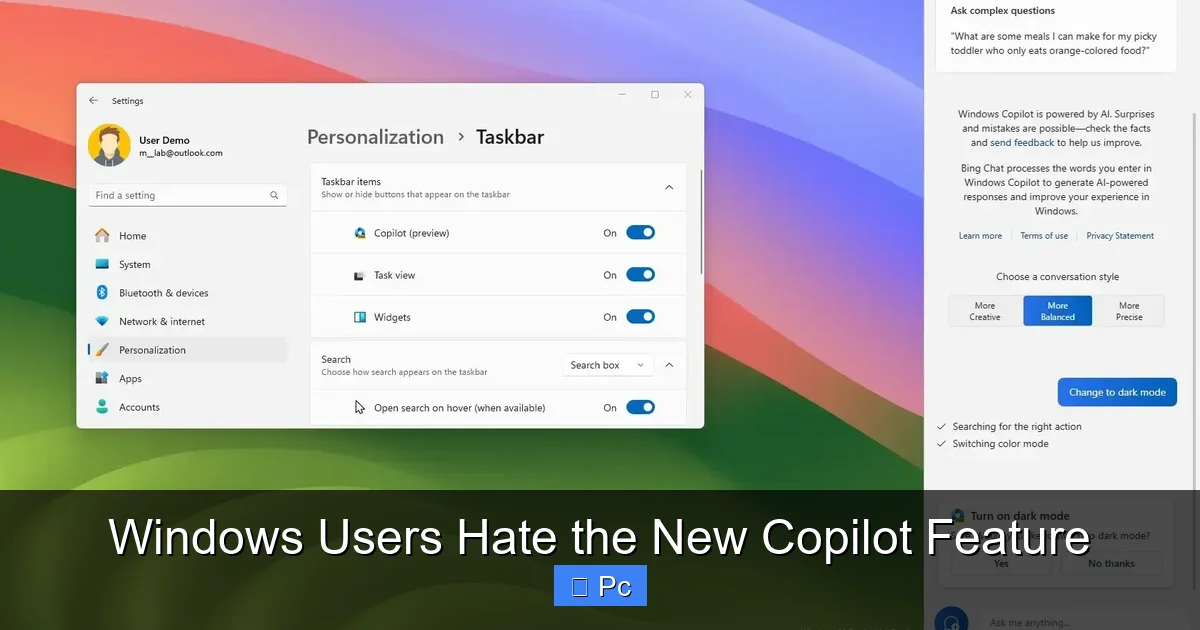
If you’ve recently updated your Windows 11 PC, you might have noticed a new icon on your taskbar—a sleek, circular button labeled “Copilot.” At first glance, it looks like just another app shortcut. But for many users, it’s become a symbol of frustration. Windows users hate the new Copilot feature, and they’re not staying quiet about it.
Microsoft introduced Copilot as part of its grand vision to bring artificial intelligence directly into the operating system. The idea sounds promising: an AI assistant that helps you write emails, summarize documents, adjust settings, and even control your PC with natural language commands. In theory, it’s like having a smart helper always ready to lend a hand. But in practice? It’s been anything but helpful for a growing number of users.
From its sudden appearance to its clunky performance, Copilot has sparked a wave of criticism across forums, social media, and tech review sites. People aren’t just annoyed—they’re angry. They feel tricked, overwhelmed, and disrespected by a feature that was pushed onto their systems without clear consent or meaningful control. And while Microsoft sees Copilot as the future of Windows, many users see it as a step backward.
Key Takeaways
- Intrusive Design: Copilot appears uninvited on the taskbar, interrupting user focus and cluttering the interface without clear opt-out options.
- Poor Integration with Legacy Apps: The feature struggles to work smoothly with older Windows programs, leading to crashes and inconsistent performance.
- Limited Practical Use Cases: Many users report that Copilot offers generic suggestions and fails to deliver meaningful assistance in real-world tasks.
- Forced Adoption Strategy: Microsoft’s aggressive rollout, including automatic updates and default enablement, has fueled user frustration and resistance.
- Privacy Concerns: Users worry about data collection, as Copilot requires access to system activity and personal files to function effectively.
- Lack of Customization: Unlike other AI tools, Copilot offers minimal settings to tailor its behavior, making it feel rigid and impersonal.
- Growing Community Backlash: Forums, social media, and tech reviews are flooded with complaints, signaling a broader rejection of the feature’s current implementation.
📑 Table of Contents
Why Windows Users Hate the New Copilot Feature
Let’s be honest: no one likes change, especially when it’s forced. But the backlash against Copilot isn’t just about resistance to new technology. It’s about how the feature was introduced, how it behaves, and how little say users have in the matter. The truth is, Windows users hate the new Copilot feature for a mix of practical, emotional, and philosophical reasons.
One of the biggest complaints is the lack of transparency. Many users didn’t even know Copilot was being installed. It showed up after a routine Windows update, often without a clear notification or explanation. Suddenly, there’s this new button on the taskbar, and clicking it opens a sidebar that feels more like a marketing demo than a useful tool. It’s like someone moved into your house without asking and started rearranging your furniture.
Then there’s the performance. Copilot is resource-heavy. On older machines, it can slow down the system, increase CPU usage, and drain battery life. For users who rely on their PCs for work or creative projects, this is a major problem. They didn’t sign up for a sluggish experience just to test an AI that doesn’t even work reliably.
And let’s talk about usefulness. While Microsoft touts Copilot as a revolutionary assistant, many users find it underwhelming. It often gives vague answers, fails to understand context, and can’t perform complex tasks. Trying to use it to write a report or debug code usually ends in disappointment. Instead of saving time, it adds another layer of frustration.
The Forced Rollout That Ignited Backlash
Microsoft didn’t just introduce Copilot—they pushed it hard. The feature was rolled out via automatic Windows updates, meaning users didn’t have to opt in. In many cases, it was enabled by default, with no easy way to disable it. This top-down approach has backfired spectacularly.
Imagine updating your phone and suddenly having a new app you didn’t ask for, can’t delete, and keeps popping up with suggestions you don’t want. That’s exactly how many Windows users feel. They didn’t choose Copilot, but now it’s part of their daily computing experience—whether they like it or not.
This kind of forced adoption is nothing new for Microsoft, but it’s especially tone-deaf in 2024. Users today expect more control over their digital lives. They want transparency, choice, and the ability to opt out of features they don’t need. By ignoring these expectations, Microsoft has alienated a significant portion of its user base.
Even tech-savvy users who might be open to AI tools are frustrated by the lack of control. There’s no simple toggle in Settings to turn Copilot off permanently. Workarounds exist, but they require editing the registry or using third-party tools—steps that shouldn’t be necessary for a basic feature toggle.
Intrusive Design and Poor User Experience
Design matters. A lot. And Copilot’s design choices have been widely criticized. The most obvious issue is its persistent presence on the taskbar. Once enabled, the Copilot button stays there, taking up valuable screen real estate. For users with smaller monitors or multiple apps open, this can be a real nuisance.
Worse, the button doesn’t always behave as expected. Sometimes it’s grayed out. Other times, it opens a blank panel or fails to respond. And when it does work, the interface feels clunky and unpolished. The sidebar slides in from the right, covering part of the screen and making it hard to interact with other windows.
There’s also the issue of context. Copilot is supposed to be “context-aware,” meaning it should understand what you’re doing and offer relevant help. But in reality, it often gets it wrong. For example, if you’re editing a document in Word, Copilot might suggest unrelated tips or ask if you want to “summarize this email”—even though you’re not using email.
This lack of precision makes the feature feel more like a distraction than an assistant. Instead of helping, it interrupts. Instead of simplifying tasks, it adds confusion. And because it’s always visible, users can’t ignore it—even when they want to.
Performance Issues and System Impact
Visual guide about Windows Users Hate the New Copilot Feature
Image source: wallpapercave.com
Another major reason Windows users hate the new Copilot feature is its impact on system performance. AI tools require processing power, and Copilot is no exception. It runs in the background, constantly analyzing your activity and preparing responses. This can lead to increased CPU and memory usage, especially on older or lower-end devices.
For example, a user with an Intel Core i5 processor and 8GB of RAM might notice their system slowing down after enabling Copilot. Apps take longer to load, web pages stutter, and battery life drops faster on laptops. These aren’t minor inconveniences—they’re deal-breakers for people who rely on their PCs for productivity.
Even on newer machines, Copilot can cause unexpected slowdowns. Some users report that their fans spin up more often, indicating higher thermal output. Others notice that Copilot triggers background processes that interfere with gaming or video editing software.
Microsoft claims Copilot is optimized for performance, but real-world reports suggest otherwise. The feature relies heavily on cloud processing, which means it needs a stable internet connection. If your connection is slow or unstable, Copilot becomes even more sluggish—or stops working altogether.
Resource Usage on Older Hardware
Older PCs are hit the hardest. Many users still run Windows 11 on machines that meet the minimum requirements but aren’t built for AI workloads. These systems often lack dedicated AI accelerators or sufficient RAM to handle background AI tasks.
When Copilot runs on such hardware, it can cause noticeable lag. Simple actions like opening File Explorer or switching between tabs in a browser become slower. In extreme cases, the system may freeze or crash—especially if multiple apps are running at once.
This creates a frustrating paradox: the users who might benefit most from an AI assistant—those with older, less powerful devices—are the ones most likely to suffer from its performance issues. Instead of enhancing their experience, Copilot makes it worse.
Internet Dependency and Latency Problems
Copilot isn’t fully local. Much of its processing happens in the cloud, which means it needs a constant internet connection. This dependency introduces latency—delays between when you ask a question and when you get an answer.
For users with slow or unreliable internet, this can be a major problem. Imagine trying to use Copilot to write a quick email, only to wait 10 seconds for a response. Or worse, having the feature time out and display an error message.
Even with fast internet, cloud-based AI can feel sluggish compared to local tools. There’s always a slight delay, and that delay adds up over time. For users who value speed and efficiency, this is a deal-breaker.
Limited Functionality and Unmet Expectations
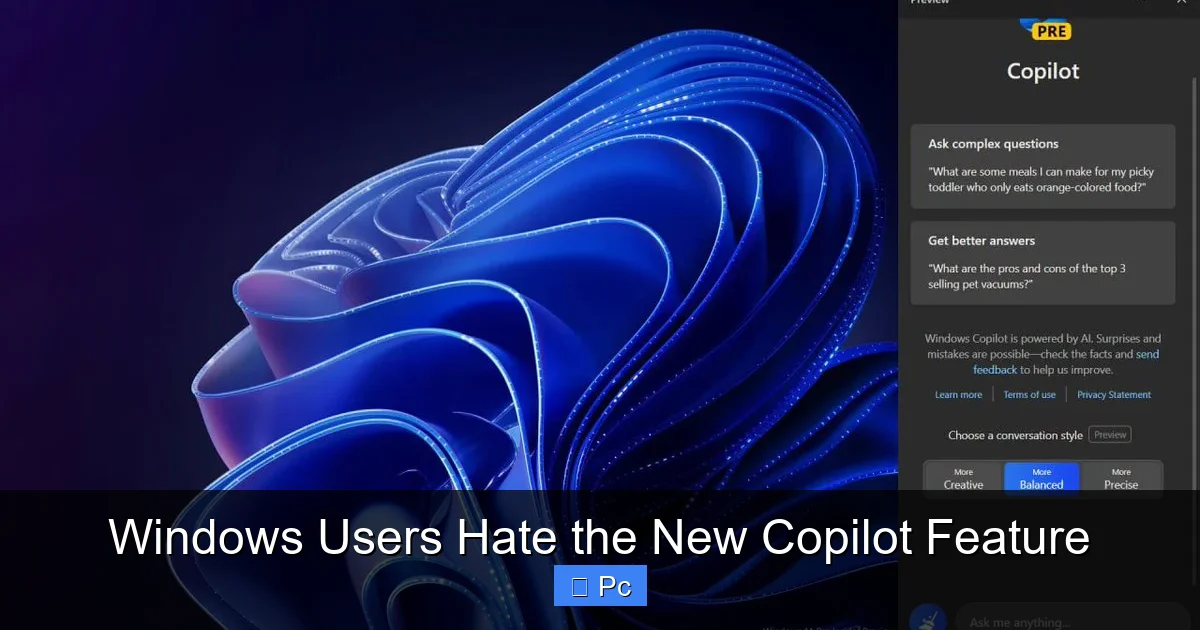
Visual guide about Windows Users Hate the New Copilot Feature
Image source: winaero.com
Microsoft has big plans for Copilot, but the current version falls short of expectations. The feature is still in its early stages, and many of its promised capabilities are either missing or underdeveloped.
For example, Copilot can’t yet control system settings in a meaningful way. You can ask it to “turn on dark mode” or “connect to Wi-Fi,” but it often fails to execute these commands. Instead, it might open the Settings app and leave you to do the rest.
Similarly, its ability to assist with creative tasks is limited. While it can generate text or summarize content, the output is often generic and lacks depth. It’s not a replacement for human insight or expertise.
Generic Responses and Lack of Depth
One of the most common complaints is that Copilot gives shallow, repetitive answers. Ask it to help write a cover letter, and it might generate a bland template. Ask it to explain a complex topic, and it’ll give you a surface-level summary.
This isn’t surprising, given that Copilot is based on large language models trained on vast amounts of public data. But it lacks the nuance and context that real users need. It doesn’t understand your specific goals, preferences, or workflow.
As a result, many users find themselves correcting or rewriting Copilot’s suggestions—defeating the purpose of having an AI assistant in the first place.
Inability to Handle Complex Tasks
Copilot struggles with multi-step tasks. For example, if you ask it to “create a PowerPoint presentation about climate change,” it might generate a few bullet points but won’t build the slides for you. Or if you ask it to “organize my desktop files,” it won’t actually move anything—it’ll just suggest you do it manually.
This limitation makes Copilot feel more like a search engine with a chat interface than a true assistant. It can provide information, but it can’t take action. And without action, its usefulness is severely limited.
Privacy and Data Security Concerns
Visual guide about Windows Users Hate the New Copilot Feature
Image source: pureinfotech.com
Privacy is a hot topic in the tech world, and Copilot raises serious concerns. To function, the feature needs access to your files, apps, and system activity. It scans your documents, emails, and browsing history to offer “personalized” suggestions.
But many users aren’t comfortable with this level of access. They worry about how their data is stored, who can see it, and whether it’s being used for advertising or training AI models.
Microsoft says Copilot processes data securely and doesn’t store personal information. But without full transparency, users are left to trust the company—something that’s becoming harder to do in an era of data breaches and privacy scandals.
Data Collection and User Trust
Even if Microsoft’s intentions are good, the perception matters. When a feature silently accesses your files and sends data to the cloud, it erodes trust. Users want to know what’s being collected, why, and how it’s protected.
Currently, Copilot’s privacy policy is vague. It mentions data usage but doesn’t provide clear opt-outs or granular controls. This lack of transparency fuels suspicion and resistance.
Potential for Misuse
There’s also the risk of misuse. If Copilot gains deeper system access in future updates, it could become a vector for malware or surveillance. Even if that’s not Microsoft’s goal, the potential exists—and users are right to be cautious.
Lack of Customization and User Control
One of the biggest frustrations is the lack of customization. Unlike other AI tools, Copilot doesn’t let you tailor its behavior. You can’t change its tone, adjust its response length, or set boundaries for what it can access.
There’s no way to disable specific features or limit its scope. If you don’t want it analyzing your emails, too bad—it’s part of the package. This one-size-fits-all approach ignores the diverse needs of Windows users.
No Simple Disable Option
The absence of a straightforward “off” switch is a major pain point. While workarounds exist, they’re not user-friendly. Most people shouldn’t need to edit the registry or use command-line tools to disable a built-in feature.
This lack of control sends a clear message: Microsoft values its AI vision more than user choice. And for many, that’s unacceptable.
The Growing Community Backlash
The backlash isn’t just anecdotal—it’s widespread. On Reddit, Twitter, and tech forums like Tom’s Hardware and Microsoft Community, users are voicing their frustrations. Hashtags like #DisableCopilot and #WindowsCopilotSucks are trending.
Some users have even created guides on how to remove or disable the feature. Others are calling for boycotts or switching to alternative operating systems.
This level of resistance is rare for a Microsoft product. It shows that Copilot isn’t just a minor annoyance—it’s a breaking point for many users.
Social Media and Forum Reactions
A quick search reveals hundreds of posts from angry users. Common themes include: “I didn’t ask for this,” “It’s slowing down my PC,” and “I can’t turn it off.” Many express disappointment in Microsoft, a company they once trusted.
Calls for Change
Some users are demanding that Microsoft make Copilot optional, improve performance, and add more customization. Others want it removed entirely until it’s truly useful.
The message is clear: Windows users hate the new Copilot feature—not because they’re against AI, but because it’s been implemented poorly.
Conclusion: A Feature in Need of Fixing
Windows users hate the new Copilot feature for good reason. It’s intrusive, poorly integrated, and offers little value in its current state. While AI has potential, Microsoft’s approach has alienated users instead of empowering them.
For Copilot to succeed, it needs to be optional, lightweight, and truly helpful. It should respect user privacy, offer meaningful customization, and deliver on its promises. Until then, the backlash will only grow.
The future of AI in Windows isn’t doomed—but it needs a reset. And that starts with listening to the users who keep the platform alive.
Frequently Asked Questions
Why do Windows users hate the new Copilot feature?
Windows users hate the new Copilot feature because it was forced onto their systems without consent, slows down performance, offers limited usefulness, and lacks customization options. Many feel it disrupts their workflow and invades their privacy.
Can I disable Copilot on Windows 11?
Yes, but it’s not straightforward. You can disable Copilot through Group Policy, Registry Editor, or third-party tools, but there’s no simple toggle in Settings. Microsoft has made it difficult to opt out permanently.
Does Copilot slow down my computer?
Yes, especially on older or lower-end devices. Copilot uses CPU and memory resources, and its cloud-based processing can cause lag, increased fan activity, and reduced battery life.
Is Copilot safe to use in terms of privacy?
Copilot requires access to your files and activity, raising privacy concerns. While Microsoft claims data is secure, the lack of transparency and granular controls makes some users uncomfortable.
Will Copilot improve in future updates?
Microsoft has announced plans to enhance Copilot with better integration, more features, and improved performance. However, until it becomes optional and truly useful, user skepticism will remain high.
Why did Microsoft force Copilot on users?
Microsoft is pushing AI as a core part of Windows’ future. By enabling Copilot by default, they aim to accelerate adoption and gather user data to refine the feature—though this strategy has backfired due to poor user experience.
