

Have you ever opened a beautifully designed website and wondered, “How does everything look so perfect?” The colors, fonts, spacing, and layout don’t just appear magically. They’re the result of something called CSS, which stands for Cascading Style Sheets. It’s the creative engine behind every stunning website. Without CSS, the internet would look like a plain document full of black text on a white background.
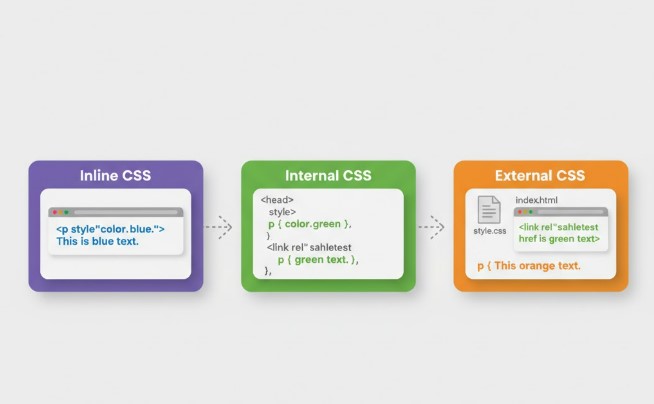
In simple terms, CSS is what gives a website its style. It controls how HTML elements—the building blocks of a webpage—appear on the screen. Whether you want bold headings, elegant typography, or responsive layouts that fit any device, CSS is the key. But what’s more interesting is that there isn’t just one way to use CSS. There are three main types of CSS, and each offers a different way to style your web pages: Inline CSS, Internal CSS, and External CSS.
These types of CSS might look similar at first glance, but they serve very different purposes. Choosing the right one can make your website easier to maintain, faster to load, and more visually consistent. Let’s dive deep into each one with examples, use cases, and real-world insights to help you master them like a pro.
Understanding the Role of CSS in Web Development
Before we explore the different types of CSS, it’s worth understanding why CSS exists in the first place. In the early days of the internet, web designers used only HTML to structure and style content. But HTML wasn’t designed for beauty; it was designed for structure. Imagine writing a letter using only plain text—no font choices, no alignment, no colors. That’s what early websites looked like.
CSS came as a savior. It separated content (HTML) from presentation (design). This separation allowed developers to focus on writing clean HTML while managing design separately. The result? Websites that are easier to update, maintain, and scale. CSS allows for global changes with minimal effort. For instance, you can change the color scheme of your entire site by tweaking just one CSS file.
In modern web development, CSS goes beyond simple colors and fonts. It handles animations, responsive design, grid layouts, and even dark mode support. However, to apply CSS styles effectively, developers use different implementation methods. These are what we call the types of CSS, and understanding them deeply is essential for every web designer or developer who wants to create consistent, beautiful, and high-performing web pages.
1. Inline CSS: The Quick Fix for Small Styling Needs
Let’s start with the simplest of all — Inline CSS. This method involves writing your CSS directly inside an HTML tag using the style attribute. It’s like painting a single wall in your house without changing the whole room’s color scheme. Inline CSS is best suited for quick, one-time changes when you don’t want to create or modify a separate CSS file.
Here’s an example of Inline CSS in action:
<p style="color:#009900; font-size:50px; font-style:italic; text-align:center;">
    Inline CSS Example
</p>
This snippet applies green color, large font size, and italic style directly to the paragraph. The result? Immediate visual changes on that specific element.
Now, while Inline CSS is convenient, it’s not always the best choice for long-term design work. If you’re working on multiple elements or large projects, using inline styles can quickly become messy. Imagine needing to change the text color of 200 elements — you’d have to manually edit each one! That’s time-consuming and error-prone.
Still, Inline CSS shines in a few situations:
- When you want to make quick design tweaks.
- When you need to override other styles temporarily.
- When you’re creating HTML-based emails where external CSS isn’t supported.
Advantages of Inline CSS
- Easy to apply and see immediate results.
- No need for external files or
<style>blocks. - Works well for single-use elements or testing purposes.
Disadvantages of Inline CSS
- Not reusable or maintainable for large projects.
- Makes the HTML file bulky and harder to read.
- Can override other CSS unintentionally, causing style conflicts.
In essence, Inline CSS is like a quick patch—it gets the job done fast but isn’t ideal for long-term use. It’s perfect for beginners learning how CSS works, or developers who want to test styles without creating extra files. However, when scalability and efficiency matter, other types of CSS take the lead.
2. Internal (or Embedded) CSS: Styling Within the HTML File
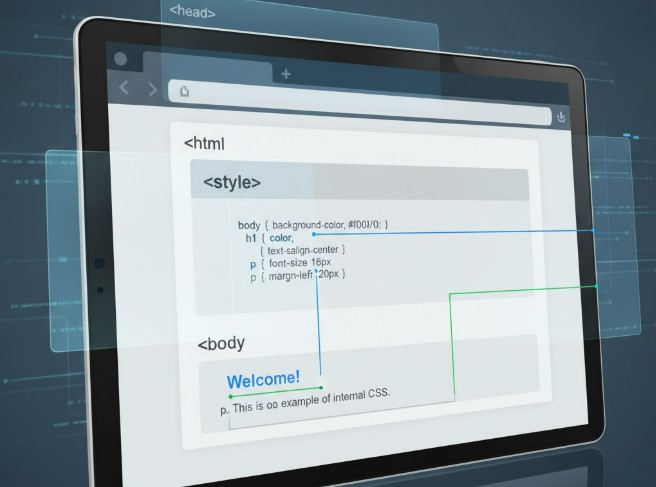
The next step in our journey through the types of CSS is Internal CSS, also known as Embedded CSS. Think of this method as decorating an entire room instead of a single wall. You’re still working within one file (your HTML), but the style is applied to multiple elements through a <style> block inside the <head> section.
Here’s an example of how Internal CSS looks:
<!DOCTYPE html>
<html>
<head>
    <style>
        .main {
            text-align: center;
        }
        .title {
            color: #009900;
            font-size: 50px;
            font-weight: bold;
        }
        .description {
            font-size: 20px;
            font-style: italic;
        }
    </style>
</head>
<body>
    <div class="main">
        <div class="title">Internal CSS Example</div>
        <div class="description">This is how Internal CSS works.</div>
    </div>
</body>
</html>
This method keeps your CSS within the same HTML file but separated from your content structure. Internal CSS is excellent when you’re building single-page websites or small projects where external files feel unnecessary. It allows you to style multiple elements consistently without cluttering each tag with inline styles.
Advantages of Internal CSS
- Styles multiple elements without repeating code.
- Keeps styling in one place within the HTML file.
- Makes debugging easier for small projects.
Disadvantages of Internal CSS
- CSS applies only to one page; not reusable across multiple pages.
- Larger HTML files slow down loading time.
- Maintaining consistency across pages becomes difficult.
So, when should you use Internal CSS? It’s best suited for:
- Landing pages or one-page portfolios.
- Demos and prototypes where you want everything in one file.
- Learning environments where simplicity matters more than scalability.
Internal CSS provides a clean, organized structure for beginners who want to see how styling interacts with HTML. However, as websites grow in size, managing multiple HTML files with embedded styles becomes a nightmare. This is where the most powerful type of CSS comes into play — External CSS.
3. External CSS: The Foundation of Professional Web Design
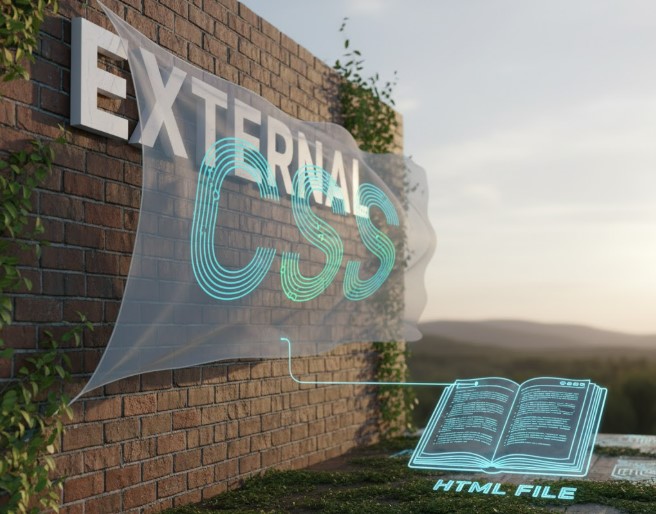
If Inline CSS is a quick touch-up and Internal CSS is local room design, then External CSS is like creating a full architectural plan for a building. This method separates the style rules into a dedicated .css file and links it to multiple HTML pages. It’s the most efficient, organized, and scalable way to style websites — and it’s the preferred approach for modern web development.
Here’s an example setup:
HTML File (index.html):
<!DOCTYPE html>
<html>
<head>
    <link rel="stylesheet" href="styles.css">
</head>
<body>
    <div class="main">
        <h1 class="title">External CSS Example</h1>
        <p id="info">This paragraph shows how External CSS works.</p>
    </div>
</body>
</html>
CSS File (styles.css):
.main {
    text-align: center;
}
.title {
    color: #009900;
    font-size: 50px;
    font-weight: bold;
}
#info {
    font-size: 20px;
    font-style: italic;
}
By linking the HTML to an external CSS file, you create a powerful connection between structure and style. The beauty of External CSS lies in its reusability—you can apply the same stylesheet to dozens or even hundreds of web pages, ensuring a consistent look across your entire website.
Advantages of External CSS
- Enhances website performance through browser caching.
- Enables consistent styling across multiple pages.
- Keeps HTML files clean and easy to read.
- Simplifies maintenance — update one CSS file to change the whole site.
Disadvantages of External CSS
- Requires an extra HTTP request (though this can be optimized).
- Doesn’t apply instantly if the CSS file fails to load.
- Slightly more complex for beginners to set up.
If you’re designing blogs, business websites, or e-commerce platforms, External CSS is the best option. It’s a professional practice used by developers worldwide because it separates design logic from content. It also aligns with the principle of separation of concerns, a key concept in modern software development.
Comparing the Three Types of CSS
To make things clearer, here’s a quick comparison table of all three types of CSS:
| CSS Type | Location of Styles | Best For | Advantages | Disadvantages |
|---|---|---|---|---|
| Inline CSS | Inside HTML tags | Quick fixes, small changes | Easy to apply, no extra files needed | Not reusable, clutters HTML, hard to maintain |
| Internal CSS | Within <style> tag in <head> | Single-page websites | Organized, reusable within one page | Not shared across pages, increases page size |
| External CSS | Separate .css file | Large, multi-page websites | Reusable, efficient, consistent, faster with caching | Needs extra HTTP request, depends on file linking accuracy |
This table helps visualize how each CSS type fits into different scenarios. As a general rule:
- Use Inline CSS for single-use tweaks.
- Use Internal CSS for one-page or test designs.
- Use External CSS for long-term, scalable projects.
Each has a place in your developer toolkit, and understanding when to use which one can save you hours of frustration down the road.
When to Use Each Type of CSS
Every type of CSS has its own time and place. Knowing when to use each one is just as important as knowing how to use them. The choice often depends on the project’s size, complexity, and long-term maintenance goals. Let’s look at when each CSS type works best.
When to Use Inline CSS
There are moments when you need quick results. You might be tweaking a single paragraph or testing a color scheme before finalizing the design. That’s when Inline CSS shines. It’s perfect for:
- Making minor adjustments or fixes on a live page.
- Applying a unique style to one specific element.
- Overriding styles temporarily for testing purposes.
- Working with environments like HTML-based emails, where external stylesheets often aren’t supported.
However, inline styling should never become a habit. It’s like using duct tape—it fixes problems quickly but isn’t elegant or sustainable for large projects. Once you move beyond small prototypes or test cases, it’s better to switch to Internal or External CSS for cleaner, more manageable code.
When to Use Internal CSS
Internal CSS is most effective for smaller or single-page projects where creating an external stylesheet feels unnecessary. If your website consists of just one HTML file, having the CSS inside that file makes everything more accessible. You can scroll through your code and see both structure and style in one place.
This method is especially helpful when:
- You’re designing a landing page, portfolio, or resume website.
- You’re running quick experiments or learning CSS basics.
- You want to keep everything self-contained for simplicity.
A key advantage of Internal CSS is that it keeps your design consistent across all elements within the same page. However, when you expand to multiple pages, you’ll notice repetition — each file needs its own <style> section. That’s when you realize the importance of using External CSS for scalability.
When to Use External CSS
In professional web development, External CSS is the golden standard. It’s used for large-scale websites, multi-page applications, and any project that values organization, performance, and maintainability. Developers love it because it promotes a “write once, apply everywhere” approach.
Here’s why you should choose External CSS:
- You want consistent design across all pages.
- You’re managing a project with a team (shared stylesheet simplifies collaboration).
- You’re optimizing website speed using caching.
- You want a clear separation between HTML (structure) and CSS (presentation).
The real beauty of External CSS lies in how easy it makes updates. If your client asks to change the brand color, you only need to edit one file. The changes reflect instantly across the entire website. This efficiency not only saves time but also reduces human error and improves SEO performance through clean, lightweight HTML.
Why External CSS Is the Best for Multiple Web Pages
When it comes to maintaining multiple pages, External CSS is unbeatable. Imagine managing a blog with 100 articles or an e-commerce site with thousands of product pages. Updating every page manually would be a nightmare. That’s where a single, linked stylesheet becomes your best friend.
Here’s why External CSS is the preferred choice:
- Consistency: The same rules apply across all pages, ensuring a uniform look.
- Efficiency: Edit one CSS file, and every page reflects the change instantly.
- Speed: Browsers can cache CSS files, reducing load time for repeat visitors.
- Organization: Keeps HTML files clean, which improves readability and SEO structure.
- Scalability: Adding new pages or sections becomes simple since they automatically inherit the same styles.
In short, if your goal is long-term growth and maintainability, External CSS is not just an option—it’s a necessity.
Best Practices for Using CSS Effectively
Once you understand the types of CSS, the next step is mastering how to use them efficiently. A strong CSS strategy can dramatically improve your website’s performance, maintainability, and user experience. Here are some essential best practices every developer should follow:
1. Keep Your CSS DRY (Don’t Repeat Yourself)
Avoid repeating the same style rules in multiple places. Instead, use classes or IDs to apply shared styles to multiple elements. For example:
.btn {
    background-color: #009900;
    color: white;
    padding: 10px;
}
Now, apply .btn to any button in your HTML rather than writing new styles for each one.
2. Use External CSS for Large Projects
For multi-page or content-heavy websites, External CSS is the most efficient choice. It ensures better caching, easier maintenance, and smaller HTML file sizes.
3. Prioritize Readability
Write clean, organized CSS with proper indentation and comments. This helps future developers (and your future self) understand what each rule does.
4. Use Specificity Wisely
Avoid overusing inline styles, as they override other CSS types and create confusion. Instead, rely on proper selectors and hierarchy to maintain control over style priorities.
5. Optimize CSS for Performance
Minify your CSS files before deployment to reduce load times. You can use tools like CSSNano or CleanCSS to remove unnecessary spaces and comments.
6. Keep Style and Structure Separate
Resist the temptation to mix styling directly into HTML unless absolutely necessary. Maintaining clear separation improves reusability and makes future design updates effortless.
7. Use External Libraries Responsibly
Frameworks like Bootstrap or Tailwind CSS can speed up development, but always customize them for brand identity instead of relying on default styles.
By following these best practices, you’ll not only make your websites look professional but also ensure they perform smoothly across all devices and browsers.
Performance and Maintainability: Why CSS Structure Matters
Your choice among the types of CSS affects not only design but also how fast and efficient your website is. Let’s break down how structure impacts both performance and maintenance.
1. Performance
When a browser loads a webpage, it reads the HTML and then fetches the linked CSS files. If you’re using External CSS, the file can be cached. That means when users revisit your site, the browser doesn’t have to re-download the same stylesheet, resulting in faster page loads. Inline or Internal CSS, however, gets downloaded every time because it’s embedded directly within the HTML.
2. Maintainability
Imagine changing your brand’s primary color from green to blue. With External CSS, you update one line in your .css file, and your whole site updates instantly. With Inline CSS, you’d have to change every inline declaration manually. That’s the difference between chaos and convenience.
So, while Inline CSS is perfect for instant fixes, and Internal CSS works for small sites, External CSS is the clear winner in the long run—offering speed, structure, and sustainability.
Common Mistakes to Avoid While Using CSS
Even experienced developers make CSS mistakes that lead to inefficiency or poor performance. Here are some pitfalls to avoid:
- Overusing Inline CSS: It clutters HTML and makes updates hard.
- Ignoring Responsive Design: Always use flexible units like percentages or
emfor mobile-friendly designs. - Forgetting Browser Compatibility: Always test CSS across browsers.
- Not Organizing Stylesheets: Use sections or comments in large CSS files for clarity.
- Mixing Multiple Types of CSS Without Need: Combining inline, internal, and external styles can cause conflicts and confusion.
Avoiding these errors keeps your CSS clean, efficient, and easy to maintain.
FAQs About the Types of CSS
1. What are the three main types of CSS?
The three main types of CSS are Inline CSS, Internal (or Embedded) CSS, and External CSS. Each method provides a different way to style HTML elements. Inline CSS is written directly inside HTML tags, Internal CSS goes within a <style> tag in the <head> section, and External CSS resides in a separate .css file linked to the HTML document.
2. Which type of CSS is best for beginners?
Beginners often start with Internal CSS because it allows them to experiment within one file. It’s easier to understand since both HTML and CSS are visible together. Once comfortable, moving to External CSS helps in mastering scalability and organization.
3. Why is External CSS preferred for large websites?
External CSS allows multiple pages to share a single stylesheet, ensuring consistent design, easier maintenance, and faster performance through caching. It also keeps HTML clean and lightweight, which improves both SEO and readability.
4. Can I use all three types of CSS together?
Yes, you can use all three types of CSS within a project, but it’s important to manage them carefully. CSS follows a cascading order, meaning inline styles override internal and external styles. Use this hierarchy wisely to avoid conflicts.
5. Does Inline CSS affect website performance?
While Inline CSS doesn’t slow down small pages significantly, using it excessively can increase page size and reduce efficiency. Since inline styles are embedded directly in the HTML, they prevent caching, leading to slower performance on larger sites.
6. Is Internal CSS suitable for responsive design?
You can make responsive layouts using Internal CSS, but it’s not ideal for multi-page websites. For modern responsive designs, External CSS with media queries is the best approach.
7. How do I link External CSS to my HTML file?
To link an External CSS file, use the <link> tag inside the <head> section of your HTML:
<link rel="stylesheet" href="style.css">
This connects your HTML document to the external stylesheet.
8. Which type of CSS gives the highest level of control?
Inline CSS provides the highest priority in the cascade, meaning it overrides internal and external styles. However, it should be used sparingly to avoid cluttered code and poor scalability.
Conclusion: Choosing the Right Type of CSS for You
Mastering the types of CSS is like learning to choose the right brush for your painting. Each has a unique purpose, and using them wisely can transform how you design websites. Inline CSS is great for quick adjustments, Internal CSS helps in styling single pages, and External CSS powers professional, large-scale projects.
For anyone serious about web development, External CSS should be your go-to. It ensures clean code, consistent styling, fast performance, and easy scalability—qualities that every successful website needs. But don’t underestimate the others; understanding how and when to use each type gives you flexibility and confidence as a developer.
Whether you’re just starting your web design journey or refining your coding skills, mastering these types of CSS will help you create websites that are not just functional but also visually captivating. CSS isn’t just about styling; it’s about storytelling—turning plain text into engaging digital experiences that captivate the world.
