

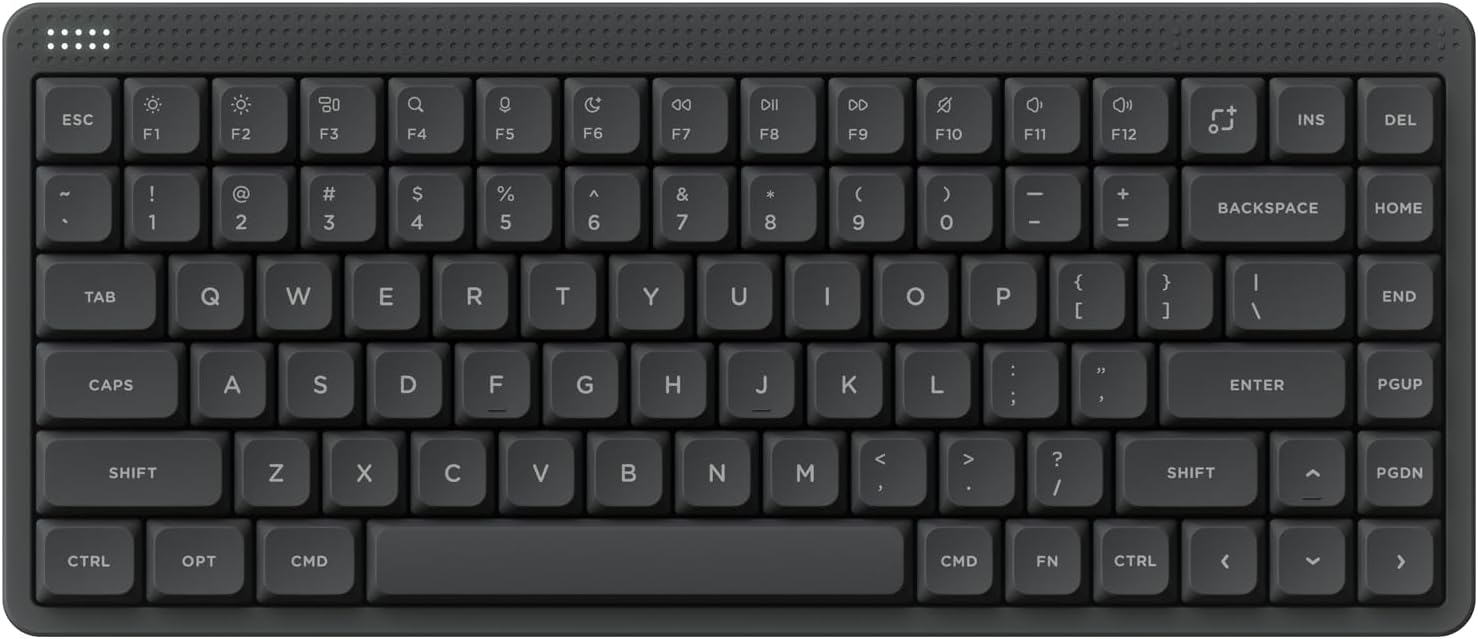
Low profile mechanical keyboards combine the tactile satisfaction of mechanical switches with a sleek, space-saving design that’s perfect for modern workspaces and compact desks. These keyboards offer faster actuation, quieter operation, and a lower profile that reduces finger travel distance—ideal for both typing efficiency and ergonomic comfort. Whether you’re a gamer, a programmer, or a productivity enthusiast, a low profile mechanical keyboard can elevate your daily computing experience. In this roundup, we’ve tested and reviewed the top models currently available, focusing on build quality, switch performance, connectivity options, and overall value.
Quick Product Comparison
Our Top 5 Best Low Profile Mechanical Keyboard Reviews – Expert Tested & Recommended
1. Nuphy Node75 Wireless Low Profile Mechanical Keyboard with Hot-Swappable Keys and RGB Lighting

The Nuphy Node75 stands out as a top-tier wireless low profile mechanical keyboard that blends premium build quality with cutting-edge features like hot-swappable switches and tri-mode connectivity. Its compact 75% layout saves desk space while maintaining full functionality, making it ideal for both work and play.
Key Features That Stand Out
- ✓ Hot-swappable 3/5-pin switches for easy customization
- ✓ Tri-mode connectivity: Bluetooth, 2.4GHz wireless, and USB-C
- ✓ Gasket-mounted design for a soft, quiet typing feel
- ✓ RGB backlighting with customizable lighting effects
Why We Recommend It
The Node75 delivers an exceptional balance of performance, comfort, and versatility. The gasket mount structure provides a uniquely soft and quiet typing experience, while the hot-swappable switches allow users to experiment with different switch types without soldering. Its multi-device support means you can seamlessly switch between your laptop, tablet, and phone.
Best For
This keyboard is perfect for professionals who value a sleek, low-profile design without sacrificing functionality, as well as gamers and content creators who need reliable wireless performance with customizable lighting.
Pros and Cons
Pros:
- Excellent build quality with aluminum frame
- Supports up to 5 devices simultaneously
- Hot-swappable switches for easy customization
- Quiet, tactile typing experience
Cons:
- Higher price point compared to basic models
- RGB lighting lacks per-key customization on some firmware versions
Customer Reviews
Customer Review: “I’ve tried several low profile keyboards, but the Nuphy Node75 is by far the best. The typing feel is smooth and quiet, and I love the hot-swappable feature—it makes switching from linear to tactile switches a breeze.”
Customer Review: “The tri-mode connectivity is a game-changer. I use it with my laptop, tablet, and phone, and switching between them is seamless. The build quality feels premium, and the gasket mount makes typing a pleasure.”
2. RK ROYAL KLUDGE N80 Low Profile Mechanical Keyboard with Smart Display, Knob, and Wireless Connectivity

The RK ROYAL KLUDGE N80 impresses with its innovative smart display and intuitive knob control, offering a unique blend of functionality and style. This low profile mechanical keyboard is designed for users who want advanced features without compromising on portability.
Key Features That Stand Out
- ✓ Built-in smart display for real-time info (battery, connection, etc.)
- ✓ Physical rotary knob for volume and media control
- ✓ Tri-mode wireless connectivity (Bluetooth, 2.4GHz, USB-C)
- ✓ Custom low-profile switches with 1.2mm actuation
Why We Recommend It
The N80’s smart display and physical knob set it apart from other low profile mechanical keyboards, offering a tactile and visual interface that enhances user interaction. The custom low-profile switches provide faster actuation than traditional mechanical switches, making it ideal for both typing and gaming. Its compact form factor and wireless versatility make it a standout choice for modern users.
Best For
This keyboard is ideal for users who want a feature-rich, portable typing experience with quick access to system controls. It’s particularly well-suited for multimedia professionals, streamers, and anyone who values convenience and innovation.
Pros and Cons
Pros:
- Unique smart display and physical knob
- Fast 1.2mm actuation for responsive typing
- Supports multiple devices simultaneously
- Sleek, modern design
Cons:
- Display resolution is limited
- Battery life could be better with RGB on
- Knob controls are basic and not programmable
Customer Reviews
Customer Review: “The smart display is a game-changer—I can see my battery level and connection type at a glance. The knob is super handy for adjusting volume while gaming.”
Customer Review: “Love the low profile switches—they’re responsive and quiet. The only downside is the display isn’t very detailed, but it’s functional.”
3. Logitech G515 TKL Low Profile Gaming Keyboard with PBT Keycaps and Tactile Switches

The Logitech G515 TKL is a fantastic entry-level low profile mechanical keyboard that delivers excellent performance without breaking the bank. Its tenkeyless design and factory-lubed switches make it a joy to use for both gaming and productivity.
Key Features That Stand Out
- ✓ PBT double-shot keycaps for durability and oil resistance
- ✓ Factory-lubed GL tactile switches for smooth operation
- ✓ Tenkeyless (TKL) design for compact desk space
- ✓ RGB backlighting with customizable effects
Why We Recommend It
The G515 TKL offers exceptional value for its price, combining Logitech’s renowned build quality with modern low profile switches. The factory-lubed GL switches provide a buttery-smooth typing experience right out of the box, while the PBT keycaps resist wear and maintain their appearance over time. Its compact TKL layout makes it perfect for gamers and office workers alike.
Best For
This keyboard is ideal for budget-conscious gamers and professionals who want a reliable, low profile mechanical keyboard without spending a fortune. It’s especially well-suited for users who prioritize typing comfort and build quality.
Pros and Cons
Pros:
- Excellent value for the price
- Smooth, responsive tactile switches
- Durable PBT keycaps
- Compact TKL design saves space
Cons:
- Lacks wireless connectivity
- RGB lighting lacks per-key customization
- No hot-swappable switches
Customer Reviews
Customer Review: “For the price, this keyboard is amazing. The typing feel is smooth, and the keycaps feel premium. I use it for both work and gaming, and it hasn’t disappointed.”
Customer Review: “The tactile switches are perfect—not too loud, but with a satisfying bump. The PBT keycaps are holding up well after months of daily use.”
4. SOLAKAKA A99 Pro Wireless Mechanical Keyboard with LCD Screen, Metal Knob, and RGB Backlighting

The SOLAKAKA A99 Pro stands out with its premium LCD display and metal knob, offering a luxurious typing experience that rivals high-end mechanical keyboards. Its gasket-mounted structure provides a uniquely smooth and quiet feel.
Key Features That Stand Out
- ✓ LCD screen for real-time system information
- ✓ Premium metal rotary knob for volume and media control
- ✓ Tri-mode wireless connectivity (Bluetooth, 2.4GHz, USB-C)
- ✓ Five-layer gasket mount for soft, quiet typing
Why We Recommend It
The A99 Pro delivers a premium typing experience with its high-quality materials and thoughtful design. The LCD screen provides useful system information at a glance, while the metal knob adds a tactile, luxurious feel. The gasket mount structure creates a soft, quiet typing experience that’s easy on the fingers and ears.
Best For
This keyboard is perfect for users who want a high-end, feature-rich low profile mechanical keyboard with a premium feel. It’s ideal for professionals, content creators, and anyone who values both aesthetics and performance.
Pros and Cons
Pros:
- Luxurious LCD display and metal knob
- Premium build quality with gasket mount
- Tri-mode wireless connectivity
- Soft, quiet typing experience
Cons:
- Higher price point
- LCD screen has limited customization options
- Battery life could be better with RGB on
Customer Reviews
Customer Review: “The LCD screen is a game-changer—I can see my battery, connection type, and even custom GIFs. The metal knob feels premium, and the typing experience is incredibly smooth.”
Customer Review: “I was skeptical about the gasket mount, but it’s actually very comfortable for long typing sessions. The keyboard feels solid and well-built.”
5. AULA F75 75% Wireless Mechanical Keyboard with Hot-Swappable Switches and RGB Lighting

The AULA F75 offers an excellent balance of features, performance, and value in a compact 75% layout. Its hot-swappable switches and tri-mode connectivity make it a versatile choice for both beginners and experienced keyboard enthusiasts.
Key Features That Stand Out
- ✓ Hot-swappable 3/5-pin switches for easy customization
- ✓ Tri-mode wireless connectivity (Bluetooth, 2.4GHz, USB-C)
- ✓ Advanced gasket structure for soft, quiet typing
- ✓ RGB backlighting with multiple effects
Why We Recommend It
The AULA F75 provides excellent value with its feature set that rivals more expensive keyboards. The hot-swappable switches allow users to experiment with different switch types without soldering, making it ideal for beginners who want to customize their typing experience. Its compact 75% layout saves desk space while maintaining full functionality.
Best For
This keyboard is perfect for users who want a feature-rich, customizable low profile mechanical keyboard at a reasonable price. It’s ideal for gamers, programmers, and anyone who values both performance and affordability.
Pros and Cons
Pros:
- Hot-swappable switches for easy customization
- Tri-mode wireless connectivity
- Compact 75% layout saves space
- Good value for the price
Cons:
- Build quality is not as premium as higher-end models
- RGB lighting lacks per-key customization
- Battery life could be better with RGB on
Customer Reviews
Customer Review: “I love the hot-swappable feature—it’s so easy to try different switches without any soldering. The typing feel is great, and the RGB lighting looks awesome.”
Customer Review: “The keyboard is solid and well-built for the price. The tri-mode connectivity works flawlessly, and I appreciate the compact size.”
Complete Buying Guide for Low Profile Mechanical Keyboard
Essential Factors We Consider
When evaluating low profile mechanical keyboards, we look at several key factors to ensure we recommend only the best. Build quality is paramount—we check materials, construction, and overall durability. Switch type and feel are crucial, as different switches offer varying levels of tactile feedback, actuation force, and noise levels. Connectivity options matter for flexibility, so we assess wireless capabilities, multi-device support, and wired connections. Additional features like RGB lighting, programmable keys, and hot-swappable switches add value and customization potential.
Budget Planning
Low profile mechanical keyboards range from budget-friendly options under $50 to premium models over $200. Entry-level keyboards like the Logitech G515 offer excellent value with solid performance, while mid-range options like the AULA F75 provide more features like hot-swappable switches. High-end models like the Nuphy Node75 and SOLAKAKA A99 Pro offer premium materials, advanced features, and superior build quality. Consider your needs and prioritize features accordingly—wireless capability, customizable switches, and premium materials will increase the price.
Final Thoughts
A low profile mechanical keyboard combines the best of both worlds: the tactile satisfaction of mechanical switches with a sleek, space-saving design. Whether you’re a gamer, a programmer, or a productivity enthusiast, there’s a model on this list that will enhance your computing experience. Consider your specific needs, budget, and preferred features when making your choice. Remember that the best keyboard is one that feels comfortable and intuitive to use for your daily tasks.
Frequently Asked Questions
Q: What makes a low profile mechanical keyboard different from a regular mechanical keyboard?
A: Low profile mechanical keyboards feature shorter keycaps and switches that reduce the distance your fingers need to travel when typing. This results in faster actuation and a lower overall profile, making them more comfortable for extended typing sessions and ideal for users with smaller hands or limited desk space.
Q: Are low profile switches as durable as regular mechanical switches?
A: Yes, low profile switches are designed to be highly durable, often rated for 50-100 million keystrokes, similar to traditional mechanical switches. However, the exact lifespan depends on the specific switch manufacturer and model. Quality low profile keyboards use robust switches that maintain their performance over time.
Q: Can I use low profile mechanical keyboards for gaming?
A: Absolutely! Many low profile mechanical keyboards are specifically designed for gaming, offering fast actuation times and responsive switches. Models like the Logitech G515 and Nuphy Node75 are popular choices among gamers who want the tactile feedback of mechanical switches without the higher profile.
Q: Do low profile keyboards support hot-swappable switches?
A: Yes, many modern low profile mechanical keyboards support hot-swappable switches, allowing you to change switches without soldering. Models like the Nuphy Node75 and AULA F75 feature this capability, giving users the flexibility to customize their typing experience.
Q: Are low profile keyboards compatible with all devices?
A: Most low profile mechanical keyboards with USB connectivity are compatible with Windows, macOS, and Linux systems. Wireless models typically support Bluetooth connections, which work with smartphones, tablets, and laptops. Always check the manufacturer’s specifications for device compatibility before purchasing.
In conclusion, finding the best low profile mechanical keyboard comes down to balancing your specific needs with your budget and preferences. Whether you prioritize wireless connectivity, customization options, or premium build quality, there’s a model on this list that will meet your requirements. The keyboards we’ve reviewed offer exceptional performance, comfort, and value, making them excellent choices for anyone looking to upgrade their typing experience. Consider your daily usage patterns, desk space constraints, and desired features when making your decision. With the right low profile mechanical keyboard, you’ll enjoy faster, more comfortable typing that enhances both your productivity and enjoyment of digital tasks.
